View all
Web DevelopmentMobile Development UX/UI DesignStaff Augmentation CTO as a ServiceDedicated TeamLow-Code DevelopmentTypeScript for Node.js Backend Development: A Practical Look at Where It Helps
Technology

Aug. 26, 2026
17 min min to read

Table of Contents
Why TypeScript Is More Common in Node.js Backends Now
What TypeScript Actually Adds to Node.js
Backend Mistakes Usually Cost More Than UI Mistakes
API Contracts Are the First Place to Care
TypeScript Helps Most at the Edges
Service Logic Is Where Types Start Paying Off
Database Types Need Boundaries Too
Integrations and Webhooks: Typed, But Still Suspicious
Express.js with TypeScript or NestJS with TypeScript?
TypeScript 6, TypeScript 7, and Why Backend Teams Should Care
AI-Generated Code Makes Types More Useful
TypeScript Backend Practices That Are Actually Worth the Effort
When TypeScript Is Probably Too Much
Migrating a Node.js Backend from JavaScript to TypeScript
Business Value of TypeScript in Node.js Backend Development
Examples from Our Work
When to Hire a Node.js and TypeScript Development Team
When you first build a Node.js backend, things are usually simple. There are just a few routes, one database model, and everyone on the team understands how it all works.
The problems show up later. The same API might end up serving a web app, a mobile app, an admin panel, and internal tools. Team roles get more specialized. Payments bring in complicated scenarios. Webhooks might show up late or even more than once. Background jobs start depending on data that was never clearly defined.
This is where TypeScript helps. Not because JavaScript is bad, or that types make your backend more professional. TypeScript just makes it easier to see what each part of your backend expects: what should be in a request, what a service needs, what a database function returns, and what the API sends back.
TypeScript won’t check real incoming data, fix a weak architecture, or replace tests. But in a Node.js backend that’s always changing, it means the team has fewer things to guess and more clear contracts they can rely on.
Why TypeScript Is More Common in Node.js Backends Now
TypeScript is no longer a niche choice for JavaScript teams. In the State of JavaScript 2025 survey, respondents reported writing an average of 77% TypeScript in their JavaScript/TypeScript work. The same survey shows backend development as a major JavaScript use case, selected by more than 7,000 respondents.
That does not mean every backend needs TypeScript. It means typed JavaScript is now part of the normal stack for many teams building products that will be maintained for years.
The more interesting signal is the pain point. In the same survey, code architecture was one of the main struggles for JavaScript developers. That tracks with what backend teams often feel after the first version ships: writing the next endpoint is easy enough; keeping the whole system understandable is harder.
TypeScript does not solve architecture. But it gives the team more visible boundaries.
What TypeScript Actually Adds to Node.js
Node.js runs JavaScript on the server. TypeScript adds a type system during development.
After checking, the code still runs as JavaScript. That distinction is important because TypeScript is often oversold.
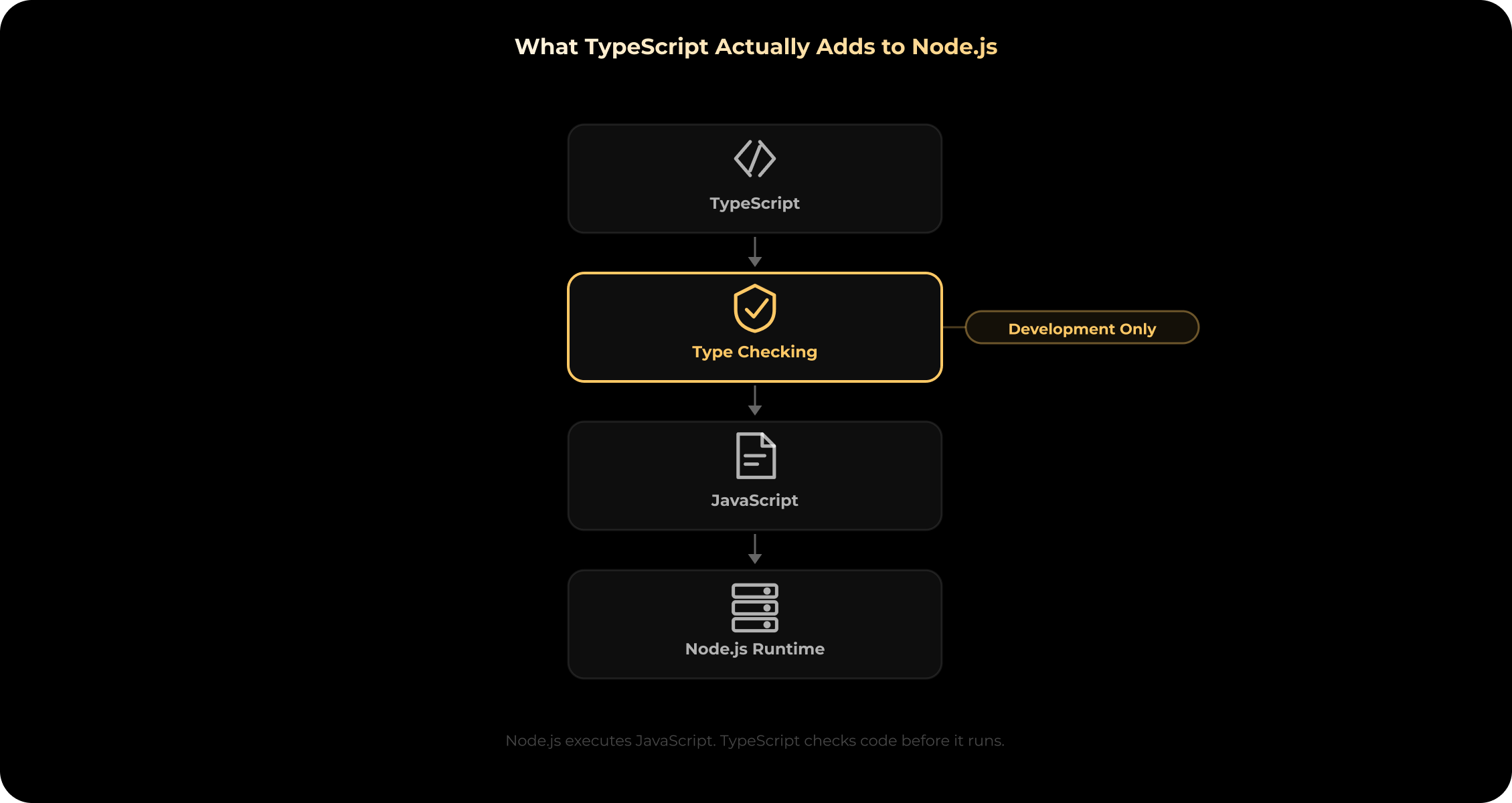
It does not make your backend faster at runtime. It does not make an API secure. It does not check if a webhook is real. It does not know whether your refund logic makes business sense.
What it does is much simpler: it makes assumptions visible in code.
A basic backend flow might look like this:
Request body → validation → service logic → database query → external API → response
Each arrow is a place where things can go wrong.
Maybe a request body is missing a field. A database query could return null. A service might get only part of a user object. A payment provider could send a status you didn’t expect. Or a response might change and break a mobile screen weeks later.
Without types, some of that knowledge lives in docs. Some of it lives in tests. Some of it lives in someone’s head.
With TypeScript, more of it is written directly into the codebase.
A service can show what it accepts. A function can show what it returns. A payment status can be limited to known values. An API response can make optional fields visible. A repository can return a specific model instead of “some object from the database.”
It is not dramatic. It is just easier to work with.
Backend Mistakes Usually Cost More Than UI Mistakes
TypeScript is often explained through frontend examples: props, buttons, forms, state. Useful, but a bit misleading.
On the backend, a small mismatch can have a bigger impact.
A wrong UI prop might show a broken label. A wrong backend state can mark an unpaid order as paid, give access to the wrong role, retry a transaction twice, send bad data to a provider, or break a financial report.
That is why typed states are useful.
pending / paid / failed
admin / manager / user
draft / published / archived
approved / rejected / under_review
deposit / withdrawal / transfer
These values seem simple on their own, but they usually get more complicated over time.
Payments can be refunded, reversed, disputed, expired, partially refunded, or manually reviewed. A user might be an admin in one workspace but just a regular member in another. Sometimes a webhook arrives late or even twice. Reports might have different rules for customers, admins, and finance teams.
TypeScript won’t create those rules for you.
But it can stop a developer from passing "done" into a function that only accepts "paid", "failed", or "pending". It can force a new status to be handled in more places. It can show where a model change reaches other parts of the backend.
That’s the real benefit: you get fewer silent mismatches.
API Contracts Are the First Place to Care
A backend API almost never serves just one client forever. Usually it starts with a web app. Then a mobile app appears. Then an admin panel. Then a partner integration. Then a small internal tool that someone built quickly because operations needed it yesterday.
Suddenly, what seemed like a “small” API change is no longer small.
A field changes from:
user.name
to:
user.fullName
The backend still works, and the endpoint still returns JSON. But somewhere else, maybe in an export, a mobile screen, a dashboard table, or an email template, the old field is still expected.
TypeScript helps teams define these contracts more clearly.
CreateUserRequest
UserResponse
PaymentStatus
PaginatedTransactions
ValidationErrorResponse
This doesn’t replace API documentation or contract tests. But it does make it harder to treat request bodies, route parameters, query parameters, responses, and error formats casually.
For API-heavy products, our Node.js development work usually starts with backend structure: data flows, validation, integrations, service boundaries, and how the API will hold up once more clients depend on it. Stubbs works with Node.js together with TypeScript, NestJS, Express.js, WebSocket tools, and modern backend infrastructure.
TypeScript Helps Most at the Edges
Backends are full of edges. Data comes in from the outside. Data leaves for another system. Most serious bugs happen somewhere near those borders.
Common examples:
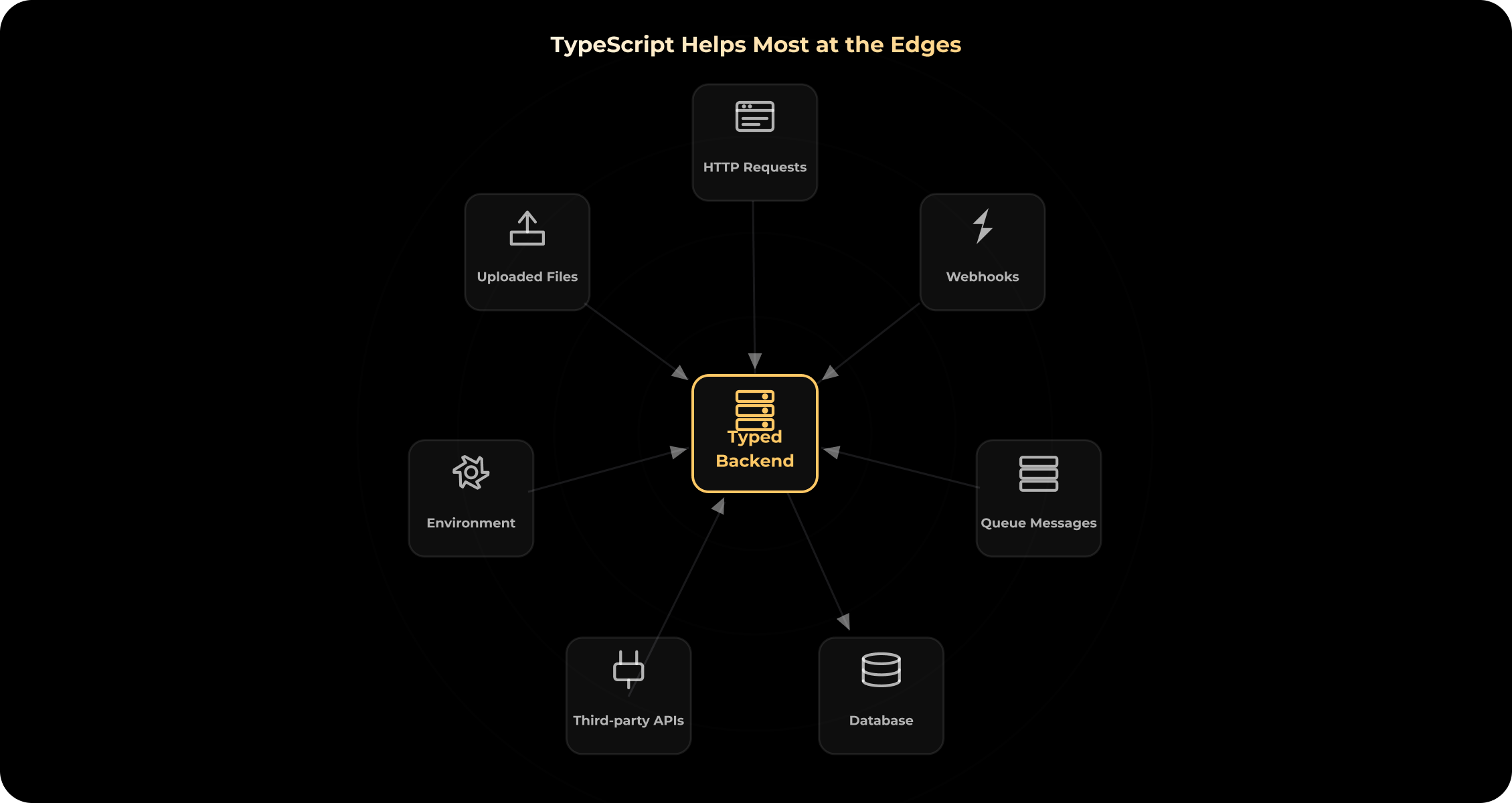
TypeScript is good at describing what the backend expects around these points. But this is where teams sometimes get overconfident.
A type can say that a webhook should include transactionId. It cannot prove the provider actually sent it. A type can say that process.env.JWT_SECRET is a string. It cannot prove the value exists in production. A type can say that a third-party API returns status. It cannot stop that provider from changing the payload.
So the rule is simple:
TypeScript describes what the backend expects.
Runtime validation checks what the backend actually receives.
For production backends, that usually means Zod, Joi, class-validator, Yup, custom validation, or NestJS validation pipes.
This is not a “nice to have” for payments, identity verification, financial data, public APIs, admin actions, webhooks, or anything involving permissions.
Typed code is good. Validated boundaries are better.
Service Logic Is Where Types Start Paying Off
Routes are usually straightforward. The real complexity is in the services.
That is where the product rules collect:
- Can this user approve the request?
- Should this payment be retried?
- Can this subscription be cancelled?
- Should this webhook update the order or be ignored?
- Which report fields can this role access?
In a small backend, a single developer can remember these rules for some time. As the project grows, these rules end up scattered across services, helpers, queues, database calls, scheduled tasks, admin tools, and third-party integrations. The original developer might move on to a different project. Someone else changes a function without realizing everywhere it’s used. QA might catch one issue but miss another.
TypeScript helps by making service inputs and outputs clear. A developer can look at a function and immediately see what it takes in. If you change a function’s signature, you’ll quickly see what breaks. Rename a field and you’ll spot dependent code sooner. Add a new status, and you’ll find out which service still needs to handle it.
Of course, you still need good judgment. Bad TypeScript is possible. If your backend is full of any, you still have a lot of unknowns. But when you use types carefully, the service layer relies less on guesswork.
Database Types Need Boundaries Too
TypeScript is useful around database code, but it can also encourage a shortcut: one type for everything.
That shortcut usually works until it does not.
A user coming from a request body is not the same thing as a user stored in the database. A database user is not the same thing as an authenticated user in a session. An authenticated user is not the same thing as the public user object returned by the API.
A product can easily end up with several shapes:
- Incoming user payload
- Database user record
- Authenticated user
- Admin user view
- Public user response
Using a single User type everywhere might seem tidy at first. But after six months, it can accidentally expose fields in API responses, make business logic depend too much on the database structure, and turn small migrations into big refactoring jobs.
A more maintainable backend separates:
- DTOs for incoming data
- Domain models for business logic
- Database models for persistence
- Response types for API output
It is slightly more work. Sometimes boring work.
But it keeps layers from bleeding into each other.
That matters in Node.js backends built with PostgreSQL, MongoDB, MySQL, Redis, Prisma, TypeORM, Mongoose, or a mix of tools. ORM-generated types are useful, but they do not remove the need to design the application model carefully.
Integrations and Webhooks: Typed, But Still Suspicious
External integrations are where even the most reliable backend code can run into trouble.
You might see a payment provider send the same webhook twice. A KYC provider could introduce a new status. Sometimes, a CRM only returns part of the data you expect. A crypto custody provider might delay a transaction update. An email API may accept your request but fail later. Or a queue could retry a job that was already finished.
TypeScript can help describe what you expect:
PaymentWebhookEvent
KycVerificationStatus
CrmContactPayload
CustodyTransaction
EmailDeliveryStatus
This is helpful because it makes your integration code easier to read and review. But external systems do not follow your type definitions. For integrations, TypeScript should sit next to validation, signature checks, idempotency, retry rules, logging, monitoring, and clear error handling. Especially with payments, finance, Web3, healthcare, or identity verification flows.
From our experience, the hard part is rarely writing the type. The harder question is what the backend should do when a provider sends something late, twice, partially, or not at all.
Express.js with TypeScript or NestJS with TypeScript?
This question comes up all the time in Node.js backend projects.
The honest answer is not very exciting: it depends.
Both Express.js and NestJS can work well with TypeScript. They just give you different amounts of structure.
Express.js with TypeScript
Express.js is still practical for lightweight APIs, MVP backends, custom HTTP services, integration layers, and products where senior developers can set the structure themselves.
The advantage is flexibility.
The cost is also flexibility.
Express will not tell you how to organize routes, controllers, services, validation, authentication, logging, error handling, database access, or tests. TypeScript can improve an Express codebase, but it will not design the architecture.
Developer discussions reflect this split. In one Reddit thread about backend TypeScript frameworks, some developers described Express-to-TypeScript migration as painful, while others said Express and TypeScript work fine together. The useful takeaway is not that one side is right. It is that Express + TypeScript depends heavily on structure and team discipline.
Stubbs provides Express.js development for APIs, web and mobile backends, microservices, integrations, and backend systems where a lightweight Node.js framework is the better fit. The Express.js page also connects Express with Node.js, TypeScript, WebSocket tools, and the broader JavaScript backend ecosystem.
NestJS with TypeScript
NestJS gives more structure.
Modules. Controllers. Services. Decorators. Dependency injection. DTOs. Guards. Pipes. Testing patterns.
For a small API, that can feel heavy. For a backend with many modules, several developers, and a long maintenance horizon, the structure can help.
Recent Reddit discussions show the same divide. Developers often describe NestJS as useful when teams want more formal backend structure around controllers, services, dependency injection, and modular architecture, but still warn that it can be overkill for smaller projects.
Stubbs supports NestJS development for structured backend systems, APIs, microservices, real-time applications, and products with more complex business logic. The NestJS page also ties it to Node.js, TypeScript, Express.js, WebSockets, and cloud platforms.
A rough rule:
| Situation | Usually better fit |
| Small API or MVP backend | Express.js + TypeScript |
| Custom backend with flexible structure | Express.js + TypeScript |
| Existing Express application | Gradual TypeScript adoption |
| Complex backend with many modules | NestJS + TypeScript |
| Larger team with shared conventions | NestJS + TypeScript |
| Long-term product with growing business logic | Often NestJS + TypeScript |
The real question is not “Which framework is better?” It is “How much structure will this backend need a year from now?”
Native TypeScript in Node.js: Useful, But Easy to Misread
Node.js has moved closer to TypeScript.
In current Node.js documentation, type stripping is marked stable for Node.js v24.12.0 and v25.2.0. By default, Node.js can execute TypeScript files that contain erasable TypeScript syntax by replacing TypeScript syntax with whitespace. No type checking is performed.
That last part matters.
Node.js stripping TypeScript types is not the same as TypeScript checking your backend.
Node.js also ignores tsconfig.json and does not support features that depend on it, such as path aliases or compiling newer JavaScript syntax to older standards. Because type stripping only removes inline types, TypeScript features that require JavaScript code generation can fail. The docs list enums, runtime namespaces, parameter properties, and import aliases among the prominent examples. .tsx files are not supported either.
So yes, native TypeScript support is useful.
For scripts, small tools, experiments, and some lightweight runtime cases, it reduces friction.
For production backends, it does not remove the need for tsc, CI type checks, validation, tests, module configuration, build strategy, framework setup, and deployment planning.
TypeScript 6, TypeScript 7, and Why Backend Teams Should Care
TypeScript itself is changing too.
TypeScript 6.0 is described by Microsoft as a transition release before TypeScript 7.0. The TypeScript team says 7.0 is based on a native compiler and language service written in Go, with TypeScript 6.0 acting as the bridge from the current JavaScript-based compiler line.
For backend teams, this does not mean “rewrite everything now.”
It means TypeScript is still being shaped around large codebases, tooling performance, stricter behavior, and modern JavaScript. The language is not standing still, and neither is Node.js.
Practical takeaway: configuration deserves attention.
A Node.js backend team should know whether the project uses ESM or CommonJS, how imports are resolved, whether files are emitted or only type-checked, how @types/node is managed, what CI runs, and how the framework expects TypeScript to be compiled or executed.
Copying an old tsconfig from a tutorial is not a backend strategy.
AI-Generated Code Makes Types More Useful
More teams are writing code with AI assistance now.
The State of JavaScript 2025 survey includes AI code generation as a tracked part of developer workflow. It reports that the average share of AI-generated code increased compared with the previous year.
This changes the role of TypeScript a bit.
AI can generate a route handler that looks plausible. It can write a DTO, a service function, a test, or an integration adapter. Sometimes it is useful. Sometimes it misses the edge case.
TypeScript gives reviewers something concrete to check against.
Does the generated function return the right shape? Does it handle optional values? Does it pass the correct status? Does it send the right payload to the provider? Does it match the existing service contract?
It does not prove the logic is correct. But it catches some mismatches earlier.
In backend code, where a plausible-looking function can still break a payment, permission, or integration flow, that extra layer is worth having.
TypeScript Backend Practices That Are Actually Worth the Effort
Good TypeScript in a Node.js backend is usually boring.
That is a good thing.
Start with API boundaries. Type request bodies, query params, route params, response objects, webhook payloads, queue messages, and service inputs.
Validate runtime data. Do not trust a request body, webhook, environment variable, queue message, or third-party response just because you wrote a type for it.
Avoid any as a habit. During migration, a little any may be practical. In production code, too much any means the team gets TypeScript syntax without TypeScript value.
Keep DTOs, domain models, database models, and response types separate. They are related, but they are not the same thing.
Run type checks in CI. Editor hints are helpful, but production code needs quality gates.
Do not overdo clever types. A generic type that only one developer understands is not maintainability. It is a future support ticket.
Be careful with shared frontend and backend types. Shared types can be useful in monorepos, but they can also couple teams too tightly if every backend change immediately shakes the frontend.
Review type changes like real code changes. Because they are.
A changed type can affect API behavior, permissions, reports, integrations, tests, and product logic.
When TypeScript Is Probably Too Much
Not every Node.js backend needs TypeScript.
A quick script does not need a full setup. A throwaway prototype might be faster in JavaScript. A tiny internal API with two endpoints and one developer may not justify the overhead.
TypeScript can also be a bad investment when the team adopts it only formally.
Files end in .ts, but everything is any.
Validation is missing.
DTOs are unclear.
Types are outdated.
No one runs type checks in CI.
In that case, TypeScript becomes decoration.
The better question is not “Should every backend use TypeScript?” The better question is:
Will this backend become expensive to change without stronger contracts?
If the answer is yes, TypeScript is worth considering early.
Migrating a Node.js Backend from JavaScript to TypeScript
A JavaScript-to-TypeScript migration should rarely start with a big rewrite.
Big rewrites feel clean in planning documents. In real projects, they often pause feature work, reintroduce old bugs, and spend too much time converting files without improving the architecture.
A better migration starts with risk.
Which endpoints break most often? Which services are scary to change? Which integrations have edge cases? Where do payments, roles, permissions, reports, or sensitive data live?
Start there.
A practical migration path might look like this:
- Audit the backend
- Add TypeScript config
- Allow JavaScript files temporarily
- Type shared utilities
- Type API contracts
- Type service functions
- Add runtime validation
- Type integration payloads
- Type database access
- Move high-risk modules
- Add CI type checks
- Reduce any gradually
The goal is not to turn .js files into .ts files as fast as possible.
The goal is to make the risky parts of the backend easier to understand and safer to change.
For teams with an existing JavaScript backend, TypeScript development services can help with migration planning, code audit, refactoring, API development, and frontend/backend TypeScript adoption without turning the project into a full rewrite. Stubbs covers JavaScript-to-TypeScript migration, TypeScript code audit and refactoring, API development with TypeScript, and backend development with TypeScript.
Move Your Node.js Backend to TypeScript Gradually
Plan a safer JavaScript-to-TypeScript migration without turning your backend into a full rewrite.
Business Value of TypeScript in Node.js Backend Development
For a founder or product owner, TypeScript is not important because developers like types.
It matters because backend uncertainty gets expensive.
The backend holds product rules, payments, permissions, integrations, data consistency, audit logs, and user states. When those parts become hard to understand, every change takes longer. Developers avoid refactoring. QA needs more manual checks. New developers need more explanations. Small API changes create surprises.
TypeScript does not remove all of that. It reduces some of the ambiguity.
| Backend problem | How TypeScript helps |
|---|---|
| API changes break clients | Makes request and response contracts clearer |
| Business logic keeps growing | Makes domain states easier to control |
| Integrations are unpredictable | Documents expected payloads next to validation |
| Developers avoid refactoring | Shows affected areas earlier |
| Knowledge sits with one developer | Makes models and contracts easier to inspect |
| AI-assisted code enters the workflow | Gives reviewers stricter contracts to compare against |
| Legacy code feels risky | Allows gradual typing of high-risk areas |
The value usually appears later.
When a developer can change an API response and see what depends on it, that saves time. When a new teammate can read a service type instead of asking three people what an object contains, that helps. When a generated function fails a type check before it gets reviewed, that helps too.
Not dramatic. But useful every week.
Examples from Our Work
TypeScript is most valuable in products where backend logic, integrations, and data models keep changing after launch. That is also where Node.js backends need clear service boundaries and API contracts.
One relevant example is Arbela, a Web3 investment platform built with Next.js on the frontend and Node.js with Express on the backend. The product combines startup discovery, community discussions, voting logic, different content types, and MongoDB for flexible data structures. In this kind of product, backend structure matters because the platform connects social interaction with investment-related workflows.
Another example is Myntkaup, a crypto trading platform for the Icelandic market. The product includes crypto trading, transaction history, financial reports, PNL tracking, admin operations, and compliance-related requirements. Myntkaup now serves 20,000+ users and ranks #1 in the Finance category on the App Store. We would not describe it as a TypeScript case unless confirmed in the stack, but it is a strong example of backend complexity where typed contracts, clear services, and careful data handling become important.
For a published TypeScript stack example, our Digital Identity Verification Platform was built with React, Next.js, and TypeScript. The product includes a mobile-first verification flow, external verification services, passport scanning, camera integration, form handling, QR authentication, and privacy-focused processing. While this case is more frontend-facing, it shows why typed contracts are useful in products with sensitive flows, uploaded data, validation states, and backend communication.
You can also explore more backend and full-stack examples in our project portfolio, including fintech, Web3, SaaS, marketplaces, mobile apps, and custom web platforms.
When to Hire a Node.js and TypeScript Development Team
A Node.js and TypeScript development team becomes useful when backend choices start slowing the product down.
Not because the team cannot write routes. Usually they can.
The problem is deeper: unclear API contracts, fragile integrations, duplicated logic, old JavaScript modules nobody wants to touch, inconsistent validation, or a framework choice that no longer fits the product.
This is often the case when a company needs to build a backend from scratch, migrate a JavaScript backend to TypeScript, stabilize API contracts, refactor legacy services, connect complex integrations, or choose between Express.js and NestJS.
It is also relevant when the backend handles payments, roles, permissions, audit logs, admin workflows, queues, webhooks, or sensitive data. These parts need more than route handlers. They need validation, tests, monitoring, and maintainable service boundaries.
Stubbs works with TypeScript across frontend and backend projects, including Node.js APIs, NestJS backends, Express.js applications, JavaScript-to-TypeScript migration, code audits, refactoring, and custom product development. Our Node.js development work covers backend systems, APIs, real-time functionality, modular architecture, integrations, and ongoing support, while our TypeScript development services cover custom TypeScript development, migration, audit, API development, and backend implementation.
The goal is not to “add TypeScript.”
The goal is to make the backend easier to change without guessing.
Conclusion
TypeScript is not required for every Node.js backend.
JavaScript can still be the right choice for small APIs, scripts, quick prototypes, and simple internal tools.
But once a backend grows beyond a few routes, TypeScript becomes more useful. It makes API contracts clearer, reduces simple type-related mistakes, helps with service-layer refactoring, and makes data models easier to inspect.
It also fits the current backend reality better than it did a few years ago. Node.js has stable type stripping, TypeScript is moving toward a new compiler generation, AI-assisted development is producing more code, and JavaScript teams are still struggling with architecture as projects grow.
None of that means TypeScript replaces validation, tests, monitoring, security, or good backend design.
It simply gives teams stronger contracts in a codebase that will keep changing.
Planning a Node.js backend or improving an existing JavaScript codebase?
Discuss your TypeScript architecture and backend development strategy with our team.
FAQ
1. Is TypeScript good for Node.js backend development?
Is TypeScript good for Node.js backend development?
Yes, especially when the backend has APIs, business logic, integrations, database models, and long-term maintenance needs. TypeScript makes backend contracts easier to see and refactoring safer. It still needs validation, testing, review, and architecture.
2. Why use TypeScript with Node.js?
Why use TypeScript with Node.js?
Use TypeScript with Node.js when the backend is expected to grow or be maintained by more than one developer. It helps describe request and response data, service inputs, database models, and integration payloads more clearly. That makes future changes less dependent on memory.
3. Does Node.js run TypeScript directly?
Does Node.js run TypeScript directly?
Modern Node.js can run TypeScript files through type stripping, and this is stable in current Node.js documentation. But Node.js does not perform type checking, ignores tsconfig.json, and does not support every TypeScript feature without extra tooling. Production backends still need proper configuration and CI checks.
4. Is TypeScript better than JavaScript for backend development?
Is TypeScript better than JavaScript for backend development?
For larger or long-lived backends, TypeScript is often the safer choice because it makes contracts explicit. JavaScript can still be enough for small APIs, scripts, prototypes, or backends with little business logic.
5. Can I use TypeScript with Express.js?
Can I use TypeScript with Express.js?
Yes. Express.js works with TypeScript, but the team has to define structure, validation, error handling, and typing patterns. Express gives flexibility; it does not give much architecture by default.
6. Is NestJS better for TypeScript backend development?
Is NestJS better for TypeScript backend development?
NestJS can be a strong fit for TypeScript backend development because it gives more structure: modules, controllers, services, DTOs, dependency injection, guards, and pipes. It is often better for larger systems. For small APIs, it may be more framework than the project needs.
7. Does TypeScript replace backend validation?
Does TypeScript replace backend validation?
No. TypeScript checks your code while you are developing, but it does not validate real data when your app is running. You still need to add runtime validation in your Node.js backend for things like request bodies, query parameters, webhooks, environment variables, queue messages, and responses from third-party APIs.
8. Can an existing Node.js backend be migrated to TypeScript?
Can an existing Node.js backend be migrated to TypeScript?
Yes. We usually recommend a gradual migration as it is safer than a full rewrite. Teams often start with shared utilities, API contracts, service logic, integration payloads, database access, and high-risk modules.
9. Does TypeScript make a Node.js backend faster?
Does TypeScript make a Node.js backend faster?
No. TypeScript will not make your backend run faster. Its main benefit is maintainability, like clearer contracts, safer refactoring, better editor support, and easier onboarding.
10. When should you not use TypeScript for Node.js?
When should you not use TypeScript for Node.js?
TypeScript may be unnecessary for a small script, short-lived prototype, simple internal API, or backend with very little business logic. It can also add overhead if the team uses any everywhere and does not maintain types properly.
Aug. 26, 2026
17 min min to read
