View all
Web DevelopmentMobile Development UX/UI DesignStaff Augmentation CTO as a ServiceDedicated TeamLow-Code DevelopmentWhat Is Express.js Used For? Practical Business Use Cases
Technology

Aug. 05, 2026
14:00 min to read
-1785922450096.webp)
Table of Contents
What Is Express.js Used For?
The Role of Express.js in a Business Application
Practical Business Use Cases
Which Products Are a Good Fit for Express.js?
When Express.js Alone Is Not Enough
Is Express.js the Right Choice for Your Product?
When to Hire an Express.js Development Company
What is Express.js used for? Primarily, this framework is used to create APIs and backend services for web applications, mobile products, SaaS platforms, marketplaces, internal tools, and systems with complex integrations. It processes routing, middleware, HTTP requests, and provides communication between client applications, databases, and external services.
When evaluating Express.js applications, it is important to understand that this is the backend layer, not the entire product. The same framework performs different roles depending on the architecture. Express.js does not include a database, payment processing, WebSockets, or a ready-made authentication system. In this article, we will analyze real Express.js use cases for business and show what additional supporting components are needed for each scenario.
What Is Express.js Used For?
By answering the questions “What is Express.js used for?” and “What can you build with Express.js?”, we can highlight 10 main areas. The framework is used to create APIs, backend systems, mobile application backends, SaaS platforms, marketplaces, integration layers, microservices, real-time application backends, internal business tools, and MVP backends.
Express.js does not create a frontend interface. It accepts HTTP requests from a browser application, a React or Next.js frontend, a mobile application, an external system, a webhook provider, or another backend service. After receiving a request, Express.js determines the route, invokes middleware, executes business logic, accesses the database or a third-party service, and returns a response. To learn more about the framework's basic concepts, check out our article on what Express.js is and how it works. In what follows, we will focus solely on the practical uses of Express.js.
The Role of Express.js in a Business Application
In modern development, Express.js typically sits between the client application and other systems. The basic architecture looks like this:
Web or Mobile Client → Express.js Backend → Database / External APIs / Cloud Services
At this level, Express.js acts as a coordinator. The main tasks performed by the Express layer are the following:
- receives requests;
- maps requests to endpoints;
- runs middleware;
- verifies authentication data;
- validates request flow;
- calls business services;
- retrieves or changes data;
- communicates with third-party APIs;
- returns structured responses;
- sends errors to centralized error handling.
The framework's foundation is built on two core concepts. Routing in Express defines endpoints via an HTTP method and a specific path, linking a client request to the desired operation. Middleware, in turn, creates a sequential request-processing flow. This is a chain of functions that process a request step by step before it reaches the core business logic.
Practical Business Use Cases
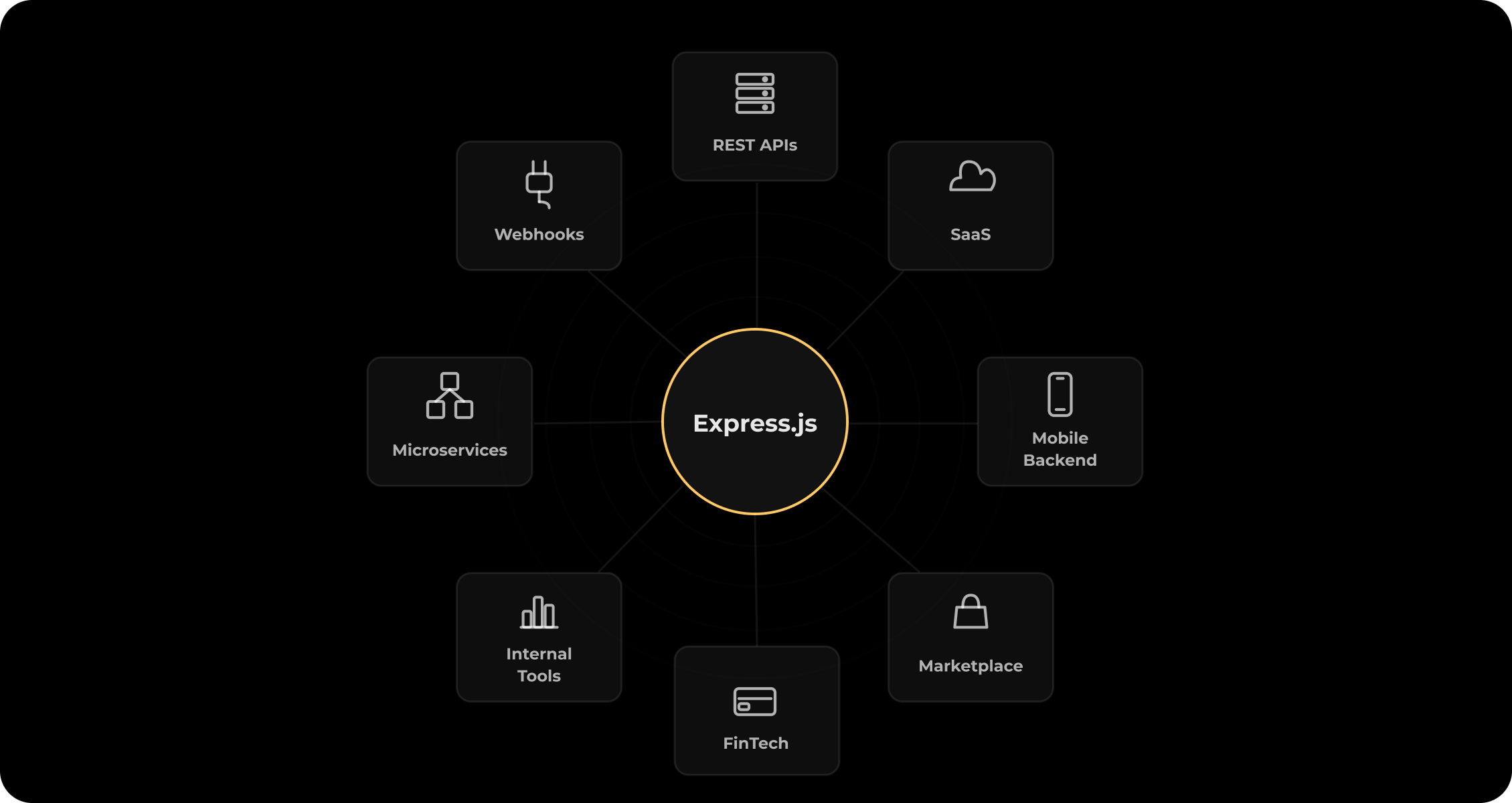
1. REST and GraphQL APIs
At the core of most modern business applications is the need for a centralized server that web, mobile, and external applications can use to retrieve and modify data. In such settings, creating an Express.js REST API is the most common use case for the framework.
During request handling, Express.js defines API endpoints, maps HTTP methods, and processes request parameters and the request body. It runs authentication and validation middleware, executes business logic, communicates with databases, and returns JSON responses. The framework handles centralized errors, thus ensuring stable service operation and standardized responses for all clients.
If the architecture requires GraphQL, it is important to understand that Express.js can host or expose a GraphQL endpoint. However, the actual GraphQL implementation is added through a separate library, such as Apollo Server.
Practical implementation examples include user account API, product catalog API, subscription API, booking API, reporting API, and partner-facing API.
For full system operation in production, you will need additional components, such as a database and ORM, validation and authentication tools, API documentation (e.g., Swagger), monitoring, rate limiting, and automated tests.
This is a strong fit if the company needs a flexible API layer and the team can competently define architectural conventions. If you're interested in professional design of such systems, consider our API development services. Using Express.js for API development allows you to build scalable and reliable backend APIs.
2. Web and Mobile Application Backends
Any frontend or mobile app requires a stable server to manage user accounts, data storage, business rules, notifications, permissions, and integrations. It's important to emphasize that Express.js is not used to create a native mobile interface. It creates the backend infrastructure that your application connects to. In this role, Express.js accepts requests from React, Next.js, React Native, or other client applications and returns the necessary data via an API.
Let's consider a practical example: a mobile fitness application. First, the mobile app sends a login request. Then, the Express backend verifies user credentials, retrieves workout data from the database, and applies configured permissions. After this, the server returns a response, and a separate external service sends a push notification to the user's device if necessary. Launching such a product requires additional components, such as a database, file storage, a push notification provider, authentication, analytics, and cloud deployment.
3. SaaS Platforms
Any modern SaaS platform requires managing complex business logic. It includes account registration, workspaces, user roles, subscriptions, dashboards, data processing, third-party integrations, and other functionality. Using Express.js for SaaS allows for flexible implementation of these requirements.
In the context of a SaaS product, the framework handles account and workspace endpoints, performs permission checks, and handles subscription-related business logic. It enables integration with the billing provider, maintains dashboard data APIs, performs tenant-aware request handling, and supports webhook processing and internal admin endpoints.
A typical B2B SaaS architecture looks like this: Frontend → Express API → Workspace Permissions → Business Logic → PostgreSQL → Stripe / CRM / Email Service
When creating a SaaS backend with Express.js, it's important to remember that the framework does not automatically provide multi-tenancy. It can process tenant-aware requests, but the isolation model and permission architecture are defined and designed by the technical team.
A full-fledged platform requires a database, a multi-tenant data architecture, a billing provider, an authentication provider, background jobs, audit logs, monitoring, and cloud infrastructure.
This is a strong fit for MVPs and modular SaaS backends. For large enterprise SaaS platforms, success depends on strong architectural conventions and experienced engineering leadership.
4. Marketplaces and E-commerce Platforms
A complex marketplace or e-commerce backend coordinates numerous processes. It handles buyers and sellers, product listings, inventory, search requests, orders, payments, commissions, delivery, reviews, and other operations. The Express.js marketplace backend is responsible for user and role endpoints, as well as product and inventory APIs. The framework manages the order workflow, provides payment provider integration, webhook processing, a seller dashboard API, and more.
Example of an order processing architecture: Customer App → Express API → Order Service → Database → Payment Provider → Delivery Service
It's important to understand that when you choose Express.js for e-commerce, you don't get a ready-made platform out of the box. The framework doesn't process payments itself. It coordinates business logic and external integrations. To launch a marketplace, you need to integrate additional components, such as a product database, a powerful search engine, a payment provider, a message queue, an email/SMS provider, file storage, fraud controls, and inventory synchronization tools.
This is a strong fit for custom marketplaces and commerce platforms with non-standard business logic, where out-of-the-box solutions limit business development. If your project requires unique functionality, our marketplace development experts will help you build the right architecture.
5. Fintech and Payment-Related Backends
Fintech products provide a wide range of financial operations. Among them are wallet and balance management, payment processing, user onboarding, KYC flows, transaction history, financial dashboards, and more.
In such complex systems, Express.js for fintech acts as the logic coordinator. The framework exposes protected API endpoints, applies authorization rules, coordinates transaction workflows, and receives provider webhooks. It communicates with payment, banking, and KYC providers. The framework returns account and transaction data and triggers logging and audit events.
A practical example of such Express usage is one of the Stubbs team's projects, a digital asset management platform for FinTech/Web3 industries. The product combines crypto and fiat, allowing users to manage corporcate accounts and pay with cards through Apple Pay and Google Pay. This project used a combination of Node.js (Express.js and NestJS) and MongoDB to create a scalable backend. The Express.js layer coordinated fiat on/off-ramp workflows, handled integrations with KYC/KYB providers, and provided complex role-based access for corporate wallets with multi-signature security.
To create a full-fledged Express.js payment backend, additional components are required. Among them are a payment or banking provider, a KYC/AML provider, an encrypted database, audit logging, secrets management, fraud monitoring, message queues, idempotency controls, and compliance-specific infrastructure.
When choosing Express.js for fintech development, remember that this framework does not ensure compliance automatically. Security, data protection, auditability, and regulatory requirements depend on your architecture and implementation. In this case study, critical data and secrets were not stored within the application itself. Access was protected through layered authentication, authorization, and infrastructure security controls. The framework's official production recommendations explicitly call for configuring TLS, validating user input, securing cookies, protecting authorization endpoints, and ensuring dependency security.
6. Real-Time Applications and Live Features
Many products require interactive features, such as chat, live notifications, collaborative editing, online status, real-time dashboard updates, order tracking, and live events. In such Express.js real-time applications, the framework handles regular HTTP API endpoints, authentication, initial data loading, configuration endpoints, and user and room permissions. It also provides integration with a WebSocket server and persistence of events and messages.
It's important to understand that Express.js doesn't have a built-in WebSocket system. It works in conjunction with real-time tooling and serves the HTTP layer application. A practical example of an Express.js chat backend looks as follows:
User Opens Chat → Express Auth Endpoint → WebSocket Connection → Message Service → Database → Live Delivery
To implement Express.js WebSocket integration, you will need the WebSocket library or Socket.IO, a pub/sub system, Redis, a message broker, a database, a push notification service, and presence management tools. This works well with additional real-time infrastructure.
7. Microservices and Modular Backend Services
When a large system is split into separate, independent components, services for authentication, billing, notifications, catalog, reporting, and user management emerge. When creating Express.js microservices, the framework acts as a lightweight HTTP layer for each individual service. In this role, it exposes endpoints, runs middleware, validates requests, communicates with other services, sends responses, and exposes health-check endpoints.
Still, Express.js does not automatically create a microservices architecture. It is effectively used within individual services as an Express.js modular backend. To support this architecture, you will need service discovery, API gateway, message broker, distributed tracing, centralized logging, container orchestration, retry policies, and secrets management.
This is a strong fit for lightweight HTTP services, but a conditional fit if the team lacks sufficient experience with distributed systems.
8. Third-Party Integrations and Webhooks
A modern product often interacts with payment services, CRM, ERP, analytics, email tools, identity providers, accounting systems, and automation platforms. In scenarios requiring Express.js third-party integrations, the framework exposes webhook endpoints, verifies incoming requests, transforms data, executes integration logic, calls external APIs, records synchronization status, and returns success or error responses.
A practical example of handling Express.js webhooks is when Stripe sends a payment event. The Express webhook endpoint receives the event. Middleware verifies the signature. The application checks whether the event has been processed previously. The order status is updated, after which it triggers a notification workflow.
As our backend engineers at Stubbs point out, when working with external integrations, it's critical to build idempotency mechanisms into the database and business logic. Without them, any random retry from the payment gateway or CRM can lead to duplicate transactions. Furthermore, systems with many webhooks require extensive monitoring. In practice, many integration issues originate from third-party timeouts, unavailable services, or API changes rather than the Express application itself.
Additional components for reliable operation include signature validation, idempotency mechanisms, queues, retry logic, monitoring, credential storage, and integration logs.
9. Internal Tools and Business Platforms
Businesses often require custom solutions, such as an admin panel, operational dashboard, finance tool, content management interface, employee portal, reporting platform, or order management system. In such products, Express.js provides data APIs, enforces internal roles and permissions, integrates with existing business systems, processes reports, triggers operational workflows, and controls access to internal functions. It's important to understand that the framework doesn't create a visual dashboard interface. Instead, it provides the backend and API.
To launch an internal tool, you will need a frontend, SSO, role-based access control, a reporting database, integrations, audit logging, and monitoring. This is a strong fit, especially if the internal tool has non-standard workflows or collects information from multiple data sources.
10. MVPs and Product Validation
At the start, a startup needs to quickly validate its product idea, user workflow, monetization model, core integration, and market demand. When working on these tasks, you can choose Express.js for MVP development. This framework creates an initial API, supports authentication, connects the database, implements core business logic, integrates essential providers, and allows the product team to iterate on endpoints.
This Express.js startup backend is practical thanks to its minimal framework layer, freedom to select only required components, a vast JavaScript/TypeScript ecosystem, and convenient integration with frontend applications.
A great example from Stubbs is the creation of Arbela, a Web3 investment platform where investors can find promising startups. The product was developed from scratch in 5 months. In conjunction with Next.js on the front end, Express.js enabled the quick design and launch of complex business logic. It included management of user-generated content (investment and discussion cards), operation of a built-in community forum, user profiles, and a voting system with strict rules. Using Express.js together with MongoDB provided high development speed and flexibility in changing data structures, which is critical for the early feedback collection stage.
You should remember that "quick start" does not mean temporary code is acceptable. Even an MVP requires basic architecture, validation, security, tests for critical workflows, a data migration plan, and basic monitoring.
Which Products Are a Good Fit for Express.js?
When choosing a technology for a new project, it's important to understand how Express.js use cases relate to your system's requirements. Below is a summary table to help you evaluate how well the framework suits your specific business needs and identify any additional components you may need.
| Product Type | Typical Express.js Role | Additional Components | Fit |
|---|---|---|---|
| REST API | Routing and request handling | Auth, database, validation | Strong |
| Web/mobile backend | API and business logic | Storage, notifications, auth | Strong |
| SaaS | Accounts, roles, subscriptions | Multi-tenancy, billing, queues | Strong |
| Marketplace | Orders, users, integrations | Search, payments, inventory | Strong |
| Fintech | Protected APIs and workflows | Compliance and security infrastructure | Conditional |
| Real-time platform | HTTP layer and permissions | WebSockets, pub/sub | Conditional |
| Microservices | Lightweight service endpoints | Gateway, tracing, messaging | Strong |
| Internal tool | Data APIs and permissions | Frontend, SSO, integrations | Strong |
| CPU-heavy processing | Workflow coordination | Workers or specialized services | Best with supporting worker infrastructure |
As the table shows, Express.js is well-suited for I/O-driven backend systems, API development, and integration-heavy products. The framework efficiently coordinates requests and external services. However, for real-time, fintech, distributed, or computationally intensive products, it is typically just one component of a broader architecture.
When Express.js Alone Is Not Enough
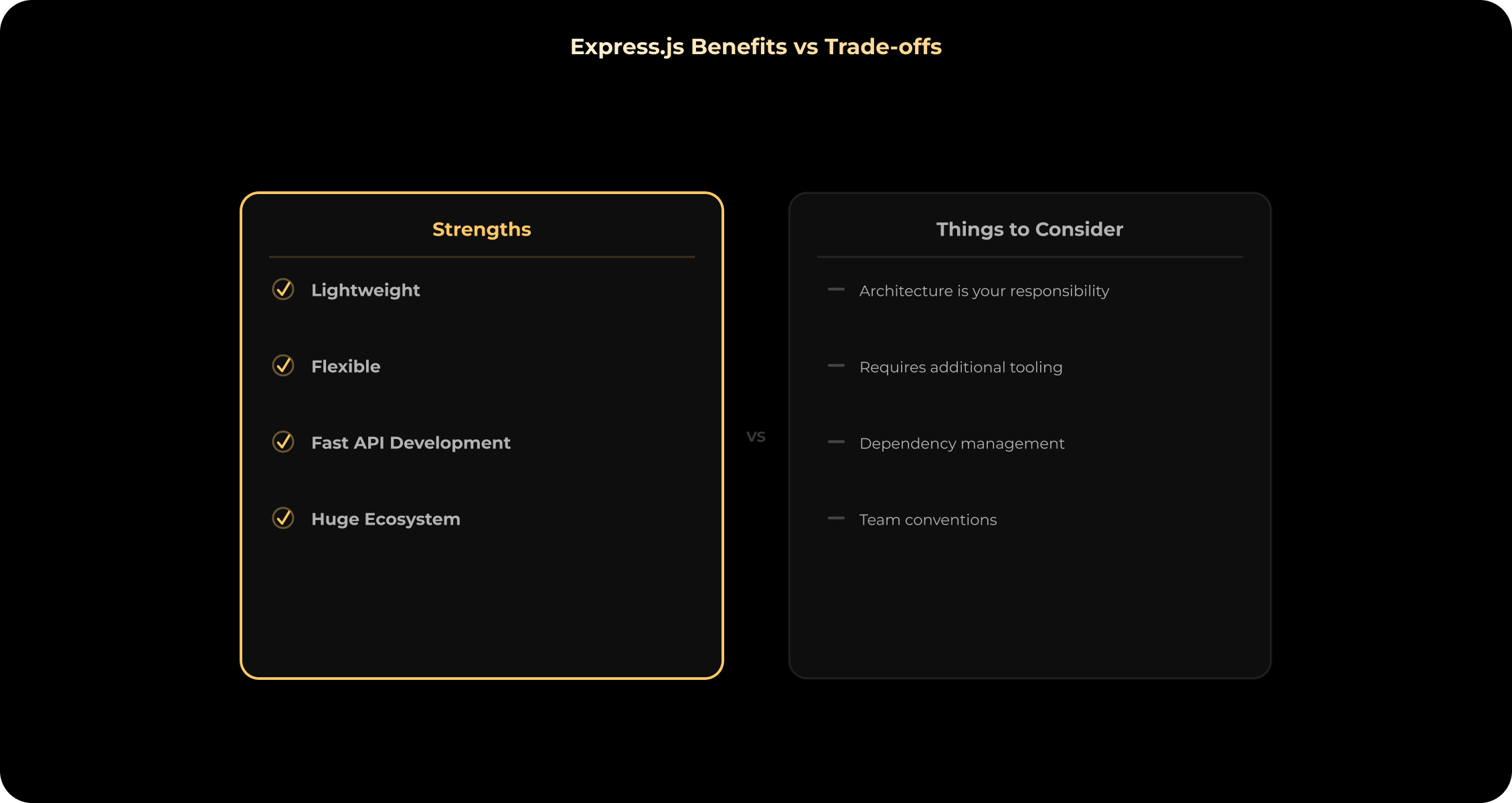
One key nuance technical managers need to consider is that Express.js is an application framework, not a ready-made business platform. The framework is intentionally minimalist. This means that Express.js does not provide the following on its own:
- database or ORM;
- complete authentication system;
- role model or access control list;
- payment processing;
- KYC/AML compliance;
- WebSockets;
- background job infrastructure;
- message queue;
- file storage;
- monitoring platform;
- complete security architecture;
- automatic application scaling or infrastructure management;
- microservices management.
Instead of built-in solutions, Express.js offers a powerful middleware mechanism. Additional features are enabled through separate packages. For example, the official middleware resource separately lists modules for working with CORS, sessions, logging, file uploads, compression, and response time.
The framework enables the technical team to create the exact backend architecture the product requires, without unnecessary framework constraints. But this freedom requires thoughtful architectural decisions, disciplined coding, and the setup of a reliable infrastructure. The freedom Express.js provides is a double-edged sword. In our experience, projects can accumulate technical debt when architectural conventions are not established early. Founders often underestimate this aspect and choose Express.js for its development speed, especially during the MVP phase. However, they forget that the lack of a rigid out-of-the-box structure requires senior engineers to have higher qualifications to maintain order in a growing codebase.
Is Express.js the Right Choice for Your Product?
When choosing backend technology, consider the specifics of your business. To determine if Express.js is right for your product, answer the following questions:
- Does the product need an API-first backend?
- Will web, mobile, or partner applications consume the same API?
- Does the team already use Node.js, JavaScript, or TypeScript?
- How complex are the business workflows?
- How many third-party integrations are required?
- Does the product need strict architecture conventions out of the box?
- Will the system process mostly I/O-driven or CPU-heavy workloads?
- Are there compliance or data-security requirements?
- Does the application need queues, workers, or real-time infrastructure?
- Who will maintain dependencies, monitoring, and deployment?
- Is the team experienced enough to define its own structure?
- Will multiple engineering teams work on the backend?
Express.js is likely a good fit when API development is a core product objective, and architectural flexibility provides high business value. It's an excellent choice if the team has experience with Node.js, the system will have numerous external integrations, and you require a completely custom backend. The framework is also great if the internal architecture standards can be established and maintained by the team itself.
Express.js may require additional evaluation when the system has strict compliance requirements or if multiple teams require strict architectural conventions out of the box. Other options should be considered if most workloads are CPU-intensive, the team expects maximum functionality out of the box, or the project lacks senior backend ownership.
Not Sure if Express.js Is the Right Choice?
Discuss your product requirements, architecture, integrations, and scalability goals with an experienced backend engineer.
When to Hire an Express.js Development Company
Even with the right technology selected, successful product implementation requires deep expertise. Engaging an external partner can be a critical success factor if:
- The backend needs to be designed from scratch;
- The product has complex user roles and access hierarchies;
- Reliable payment or external integrations are required;
- The system processes a large number of webhooks;
- A secure mobile API needs to be designed;
- The team is moving from the MVP stage to a production-ready product;
- A monolithic backend needs to be intelligently divided into modules or services;
- There are serious security or performance concerns;
- The internal team lacks senior Node.js expertise.
An experienced Express.js development company can help determine whether Express.js is suitable for the product, design the backend architecture, select supporting tools, and implement APIs, integrations, and production infrastructure. Our specialists will help lay the right foundation that will allow your product to scale without accumulating technical debt.
Conclusion
Express.js is most often used as a flexible backend layer for a wide range of products. These include APIs, SaaS platforms, web and mobile applications, marketplaces, microservices, complex integrations, internal tools, and real-time products.
The framework efficiently and predictably helps process requests, manage routes, run middleware, and generate responses.
The choice of technology should depend not on its market popularity, but on your product requirements, team experience, architecture complexity, planned integrations, and maintenance plans.
Planning a custom backend?
Discuss your product requirements with our specialists. We'll help you determine whether Express.js is the right fit for your backend architecture and long-term scalability.
FAQs
1. What is Express.js mainly used for?
What is Express.js mainly used for?
Express.js is used to build APIs and backend services for web applications, mobile apps, SaaS platforms, and marketplaces. It handles routing, middleware, request processing, and responses.
2. What types of applications can be built with Express.js?
What types of applications can be built with Express.js?
Express.js can support REST APIs, SaaS platforms, mobile backends, marketplaces, real-time applications, microservices, dashboards, and integration-heavy systems.
3. Is Express.js used for frontend or backend development?
Is Express.js used for frontend or backend development?
Express.js is primarily a backend framework. A frontend built with React, Next.js, Vue, or a mobile technology can communicate with an Express.js backend through APIs.
4. Can Express.js be used for mobile apps?
Can Express.js be used for mobile apps?
Express.js can provide backend APIs, authentication, data access, business logic, and integrations for iOS, Android, and cross-platform mobile applications. However, you cannot use it to build the mobile interface.
5. Is Express.js good for SaaS development?
Is Express.js good for SaaS development?
Yes, it can be a good choice for SaaS backends, especially when the product needs custom APIs and integrations. However, some functions should be designed separately. Among them are multi-tenancy, subscriptions, permissions, queues, and monitoring.
6. Can Express.js be used for e-commerce and marketplaces?
Can Express.js be used for e-commerce and marketplaces?
Yes. Express.js can handle product, user, order, seller, and administrative APIs. Payments, inventory synchronization, search, fraud controls, and delivery integrations usually depend on external providers or additional services.
7. Can Express.js build real-time applications?
Can Express.js build real-time applications?
Express.js can handle the HTTP and API layer of a real-time application. Live communication typically requires WebSocket tooling, such as Socket.IO, and may also require Redis or another pub/sub system.
8. Is Express.js suitable for microservices?
Is Express.js suitable for microservices?
Express.js can be used as a lightweight HTTP framework inside individual microservices. Still, you will have other architectural concerns, such as service discovery, messaging, tracing, deployment, and orchestration.
9. Is Express.js suitable for fintech applications?
Is Express.js suitable for fintech applications?
Express.js can support backend APIs and workflows for fintech systems, but it does not automatically provide compliance or security. The product requires additional controls for authentication, encryption, auditability, provider integrations, and regulatory requirements.
10. When should a business not use Express.js?
When should a business not use Express.js?
Express.js may not be the best fit when the team needs strict architecture conventions out of the box or expects the framework to provide complete authentication, security, data, and infrastructure functionality. Also, it is not suitable if the team lacks backend expertise.
Aug. 05, 2026
14:00 min to read