View all
Web DevelopmentMobile Development UX/UI DesignStaff Augmentation CTO as a ServiceDedicated TeamLow-Code DevelopmentWhat Is Express.js? Features, Benefits, Use Cases, and Limitations
Technology

Aug. 05, 2026
16 min to read
-1785923693665.webp)
Table of Contents
What Is Express.js?
How Does Express.js Work?
Express.js vs. Node.js: What's the Difference?
Main Features of Express.js
What Does Express.js Provide Out of the Box?
What Is Express.js Used For?
Benefits of Express.js
Limitations of Express.js
When Should You Use Express.js?
When May Express.js Not Be the Best Choice?
How to Decide Whether Express.js Fits Your Project
Do You Need an Express.js Development Company?
If you're wondering “What is Express.js?”, the answer is straightforward. It's a minimalist, flexible backend framework built on Node.js. It provides basic routing, middleware, and HTTP utilities that help developers build APIs, web application backends, and server-side services.
It's important to understand that this Express.js framework runs on Node.js and isn't a replacement for it. Its core value lies in simplifying common server-side tasks and speeding up development cycles. However, its flexibility doesn't mean all the necessary tools are built in. Development teams will have to make many architectural decisions themselves.
In this article, we will answer in detail the common questions “What is Express.js used for?” and “How does it work under the hood?” We will analyze its advantages and limitations, and show which products it's best suited for.
What Is Express.js?
To fully understand “What is Express.js?”, we need to highlight its role in the technology stack. Express.js is a web application framework for Node.js that handles HTTP requests, routing, and middleware.
It is not a programming language, runtime, database, or frontend framework. According to the official documentation, it is a "minimal and flexible Node.js web application framework." It provides a robust set of features for web and mobile applications, as well as API development.
The framework is built on two key mechanisms:
- Routing defines how the application responds to a request to a specific endpoint.
- Middleware is the set of functions that access the request and response objects.
These features allow the Express.js framework to quickly structure backend logic without being tightly coupled to a specific architecture.
Express.js in Simple Terms
Imagine Node.js as the engine and chassis of a car, providing the basic power for propulsion. In this case, Express.js is the steering wheel, pedals, and dashboard. Node.js provides the environment in which the backend runs, and Express.js provides a practical layer for conveniently organizing requests, routes, middleware, and responses.
How Does Express.js Work?
To understand “How does Express.js work?”, it's important to consider the standard Express.js request-response cycle. The entire data processing flow can be described in several sequential steps:
- A browser, frontend, or mobile app sends an HTTP request.
- Node.js receives this network request at the server level.
- Express passes it through the registered Express.js middleware.
- The Express.js routing engine finds the endpoint that matches the request, for example, POST /login.
- The route handler executes the required business logic.
- The application can access a database or an external service.
- Express generates and sends an HTTP response back to the client.
- If an error occurs at any stage, it is passed to the error-handling middleware.
If we imagine this flow briefly, it will look like this:
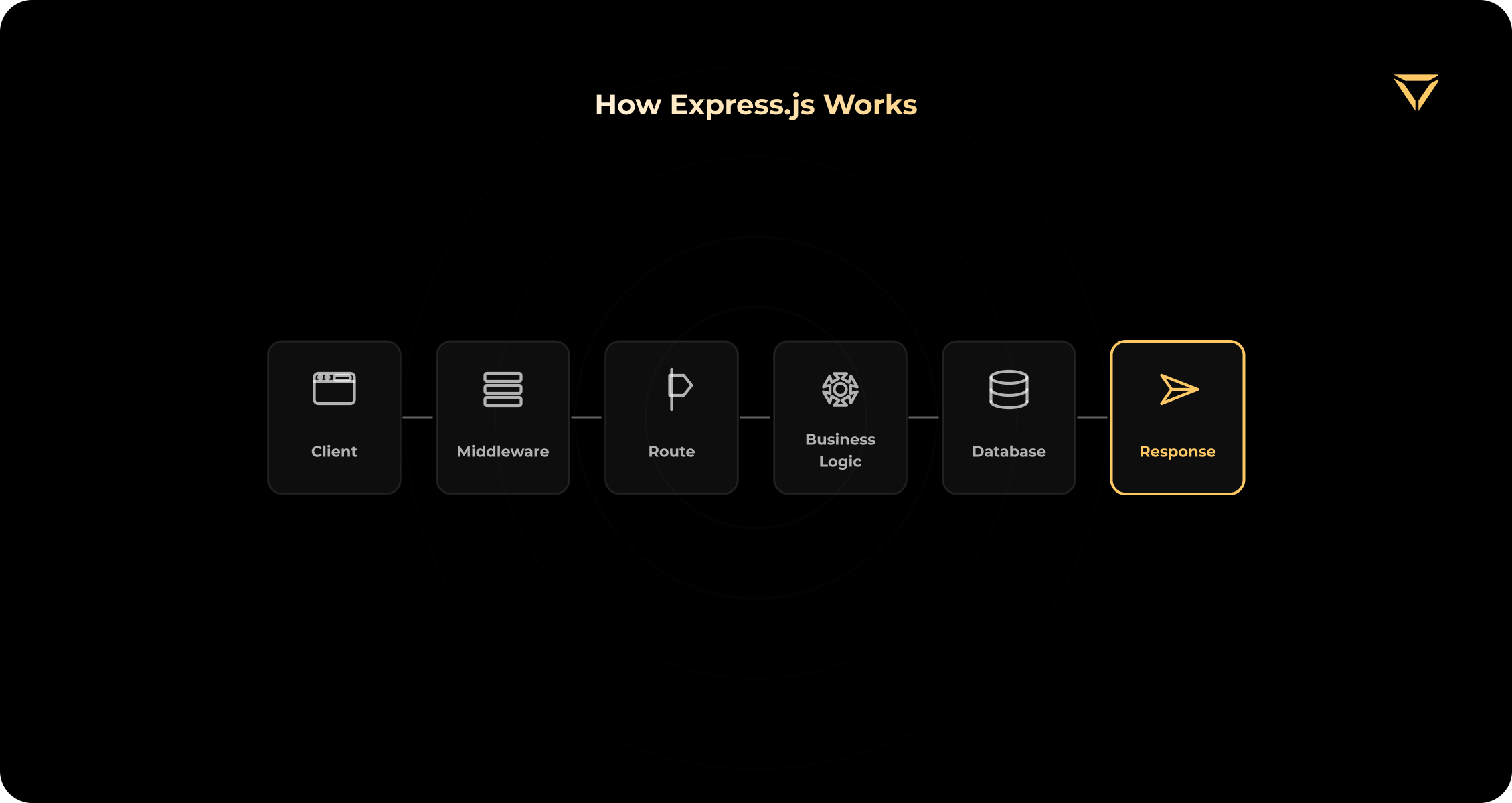
Let's imagine a user clicks the "Log in" button. The frontend sends the email and password to the server. First, the middleware intercepts the request and checks its format, for example, parses JSON. Then, the authentication logic checks the credentials against the database. If the data is correct, the backend retrieves the user's data and returns a successful response.
A detailed description of how routes work and how to configure them is available in the official routing guide.
Express.js vs. Node.js: What's the Difference?
Many beginners search for the difference between Node.js and Express.js, mistakenly believing they are mutually exclusive. The key point to remember is that Node.js and Express.js are not competitors.
Node.js is a JavaScript runtime environment that allows you to run JavaScript on the server side. Express, in its turn, runs on top of it as the convenient Express.js Node.js framework, providing ready-made abstractions for faster backend development.
You don't have to choose one tool over the other. Express is impossible without Node.js. Building a backend solely on pure Node.js requires developers to manually implement routing logic and handle each HTTP request using built-in low-level modules. Express takes care of this tedious work. For a clearer understanding of Node.js vs. Express.js, take a look at the table:
| Aspect | Node.js | Express.js |
|---|---|---|
| Type | JavaScript runtime | Backend web framework |
| Main role | Runs server-side JavaScript | Simplifies web and API development |
| HTTP server | Available through core modules | Adds higher-level routing and helpers |
| Routing | Must be implemented manually | Built-in routing mechanism |
| Middleware | No Express middleware architecture | Core development pattern |
| Relationship | Foundation | Runs on top of Node.js |
If the architecture of your future product requires high reliability and the right choice of core technologies, you can learn more about approaches to Node.js development and designing scalable server systems.
Main Features of Express.js
This framework's popularity stems from its minimalist yet powerful core. Below are the key Express.js features that make it the de facto standard for thousands of teams worldwide.
Routing
The Express.js routing supports both static and dynamic route parameters. For larger applications, developers can group related endpoints using the built-in express.Router() class. This makes the codebase modular and easy to maintain.
Middleware
This is the heart of the framework. Express.js middleware is a sequence of functions that each request goes through before a response is generated. With their help, the following tasks can be implemented: authentication, logging, request validation, CORS setup, body parsing, and response compression. The official documentation divides middleware into five types: application-level, router-level, error-handling, built-in, and third-party middleware.
According to practical observations from our backend team, the order of middleware calls is critical. The most common cause of unobvious bugs we have to fix in our clients' Express applications is incorrect registration of the authentication middleware and request parsing middleware within the request pipeline.
Request and Response Handling
Express simplifies interaction with client data. Developers have easy access to URL parameters, query parameters, request bodies, and HTTP headers. Furthermore, the framework provides concise methods for quickly sending JSON responses, setting status codes, and executing redirects.
Error Handling
A high-quality backend requires reliable failure handling. Express.js error handling is implemented through a dedicated centralized function. It's important to understand that the framework provides an error-interception mechanism but not an automatic error-management strategy. The team must decide how to log failures. Also, it should determine the format in which the response should be returned to the client.
Database and Service Integration
Unlike many monolithic systems, Express is not tied to one particular database. Express.js database integration can be done by connecting to the appropriate Node.js driver or ORM library. You can integrate with databases such as MongoDB, PostgreSQL, and MySQL, as well as supporting technologies like Redis. You can also integrate with APIs, payment systems, CRMs, and more.
Flexible Application Structure
Express doesn't impose a rigid architecture. It doesn't dictate a specific folder structure, MVC pattern, embedded database, or a specific authentication provider. This flexibility is both a major advantage and a significant limitation. It allows for quick custom service creation, but in larger projects, it requires teams to adhere to strict internal conventions to avoid architectural chaos.
What Does Express.js Provide Out of the Box?
Beginners often make the mistake of assuming that the framework contains everything needed to launch a complex product. However, Express provides a lightweight foundation for routing and processing HTTP requests, while a full-fledged production backend would require additional architectural and security solutions. According to the official security documentation, developers must configure TLS, input validation, secure cookies, and brute-force protection. They should also monitor dependency security and implement other production security practices. Express does not have a built-in database, its own authentication system, or out-of-the-box WebSockets.
| Available in Express | Usually Added Separately |
| Routing | Database driver or ORM |
| Request and response utilities | Authentication |
| JSON and URL-encoded body parsing | Authorization |
| Static file serving | Request validation |
| Middleware system | Logging and monitoring |
| Error-handling mechanism | Rate limiting |
| Router modules | Testing tools |
| HTTP helpers | WebSocket library |
As the table shows, the framework doesn't provide a complete enterprise architecture. All business logic, strict validation, and integration with data stores are the responsibility of your engineering team.
What Is Express.js Used For?
When answering “What is Express.js used for?”, it's important to understand its precise role in the system. It isn't a standalone product. It rather serves as a reliable layer that connects the client to the business logic. Let's look at the main Express.js use cases in practice.
REST API Development
When using Express.js for API development, you can be sure that the framework performs a clear task. It accepts HTTP requests, routes them to endpoints, and executes business logic. It securely accesses the database and returns JSON responses to the client.
Web and Mobile Application Backends
When building Express.js web applications or mobile products, it's important to remember that the framework operates exclusively on the backend. The frontend or mobile app communicates with it via an API to request or send data.
SaaS Platforms
For this kind of platform, Express handles important backend tasks. Express applications can implement billing logic and integrate with external billing providers.
Marketplaces and E-commerce Platforms
Marketplaces need to manage product data, users and roles, orders, and administration. Express does not process financial transactions. Still, it is used to integrate with payment providers via an API. It receives webhooks and updates purchase statuses in the database.
Real-Time Applications
Express handles the underlying HTTP layer for chats, notification systems, collaborative tools, and live dashboards. However, you need to use WebSocket libraries such as Socket.IO for apps that offer communication in real-time.
Microservices
In modern distributed systems, Express.js microservices serve as a fast, lightweight HTTP layer. The framework doesn't automatically create a microservice architecture. Still, it is good for deploying compact, independent services.
Webhooks and Third-Party Integrations
Express is effective for processing events from third-party systems, such as Stripe events. It is used to synchronize with CRM systems and to work with email services, analytics, automation tools, and identity providers.
MVP and Startup Backends
A small core and quick setup make the framework an excellent choice for launching an MVP. However, this rapid start carries a risk, since it doesn't eliminate the need to implement strict architectural conventions early on. Otherwise, the code will quickly become unreadable.
| Use Case | Express.js Role | Additional Components |
|---|---|---|
| REST API | Routes and request handling | Database, validation, auth |
| SaaS | Backend and integrations | Billing, roles, monitoring |
| Mobile backend | API layer | Push notifications, storage |
| Real-time app | HTTP server and routes | WebSockets or Socket.IO |
| Microservice | Lightweight service endpoint | Messaging, observability |
| Marketplace | Business logic and APIs | Payments, search, queues |
Benefits of Express.js
When choosing a technology stack, tech leaders often ask: why use Express.js? The main benefits of Express.js lie in the practical benefits for the development process and scaling.
Lightweight Core
The minimalist framework layer doesn't hide the underlying Node.js capabilities. This allows engineers to fine-tune the server. They are not forced to wrestle with complex or redundant abstractions.
Faster API Development
Express reduces boilerplate code thanks to built-in routes, middleware, and response helpers. This accelerates the launch of your product.
Flexible Architecture
One of the main advantages of Express.js is architectural freedom. The team isn't constrained by rigid boundaries. They can independently choose the database, ORM, validation and authentication libraries, optimal folder structure, and suitable cloud infrastructure.
Large JavaScript Ecosystem
The framework provides access to a vast ecosystem of npm packages and Node.js tools. This allows developers to quickly find ready-made integration solutions.
JavaScript Across the Stack
The ability to use JavaScript or TypeScript on both the frontend and backend simplifies communication within the team. Still, this doesn't guarantee budget reduction or instant delivery.
Strong Fit for APIs and Integration-Heavy Products
Express is effective for products that require flexible support for multiple endpoints, webhooks, and external integrations, as well as reliable support for frontend and mobile clients.
Easy to Start, Familiar to Many Node.js Developers
This tool has a relatively low basic entry barrier. However, it's important to understand that while it's easy to start coding, creating and maintaining a resilient production architecture will require maturity and experience from your engineering team.
Limitations of Express.js
When discussing the Express.js pros and cons, we at Stubbs can't ignore its weaknesses. It's important to understand that the main Express.js limitations stem from its main advantage, absolute freedom of action. This section shouldn't be viewed as a list of critical defects, but rather as a list of architectural challenges your team should be prepared for.
No Enforced Application Architecture
The framework doesn't force you to organize controllers, services, repositories, modules, business logic, or dependency management in a certain way. The entire folder and file structure is created from scratch by developers.
Flexibility Can Create Inconsistent Codebases
Freedom can lead to chaos if you don’t have team conventions. Developers can build the same features in different ways within a project. That is why the code can be difficult to read and maintain.
Many Production Features Require Additional Tools
Express provides only routing and HTTP utilities. Everything else should be configured separately. These functions include authentication, authorization, validation, monitoring, logging, and more.
Dependency Management Requires Attention
You will need to use many third-party npm packages, which create additional responsibilities. The team must update packages and monitor their vulnerabilities to provide quality maintenance and security for your project.
Large Teams Need Strong Conventions
Express can be successfully used in large-scale systems. Still, this requires a documented architecture, regular code reviews, dependency policies, and more.
Not Designed for CPU-Heavy Work as a Single Solution
Express excels at I/O-driven backend tasks such as database, network, and file system access. However, Node.js executes JavaScript on a single event loop. If a product requires complex CPU-heavy operations, such as video processing and heavy math, they should be moved to worker processes, background jobs, separate services, or specialized infrastructure.
To summarize, the disadvantages of Express.js are rarely related to the framework's code itself. The problem isn't the tool's size, but whether the engineering team has sufficient architectural discipline to use it properly over the long term.
When Should You Use Express.js?
Express is a reliable and predictable tool. It handles the most common web development tasks. It's effective for teams that need a thin, manageable layer between the server and business logic.
You should choose this framework if your team is tasked with building a fast, scalable REST or GraphQL API. It is also an excellent choice when the product has independent web and mobile clients that must receive data from a single backend. Express fits naturally into processes where the team is already working with JavaScript or TypeScript. It allows one language to be used at all levels of the stack.
In addition, the framework reveals its potential when the project requires a flexible architecture without strict restrictions or if a large number of third-party integrations are expected. It is good for creating SaaS or marketplace platforms, or for launching MVPs, where speed of iteration is critical. Finally, Express remains one of the most widely adopted frameworks for building lightweight backend services.
| Requirement | Express.js Fit |
|---|---|
| Fast API development | Strong |
| Flexible library selection | Strong |
| JavaScript-based stack | Strong |
| Strict architecture out of the box | Weak |
| Large modular team without internal standards | Risky |
| Real-time functionality | Good with additional tools |
| CPU-heavy calculations | Requires a separate processing layer |
When May Express.js Not Be the Best Choice?
Despite its popularity, Express isn't a one-size-fits-all solution for every project. It's best to avoid it if your team requires a strict, out-of-the-box modular architecture from the beginning of the project. In situations where multiple teams must work on a single monolith using identical patterns without additional internal standards, a more regulated tool is better.
Express may not be the best choice if your product primarily runs CPU-heavy workloads. Go, Rust, Java, and other multithreaded languages may be a better fit in this case. It's also risky to use this framework if the team lacks sufficient backend architecture expertise and cannot properly design the system from scratch.
Finally, it's worth considering alternatives if most of the required features (e.g., built-in ORM, strong typing, dependency injection) are already better covered by another specialized framework. Also, an alternative is needed if the business mistakenly expects the basic web framework to address security, scalability, and maintainability issues without developer effort.
Not sure if Express.js is the right fit for your backend?
Get a technical consultation before making architecture decisions.
How to Decide Whether Express.js Fits Your Project
Choosing a backend framework is an important decision that will affect your product for years to come. To make an informed decision, technical leaders and business owners need to analyze the project's real needs rather than rely solely on trends.
We suggest using a simple decision framework. Answer the following questions before starting development:
- What type of product are you building? It can be an MVP, an internal tool, a complex SaaS, or a microservice.
- Do you need an API-first backend? If so, Express is a good candidate for this task.
- Does the team already work with Node.js? Knowledge of the ecosystem is critical to success.
- How complex is the business logic? The more complex the logic, the more rigorous the custom architecture should be.
- How many developers will maintain the backend? Large teams need strict rules that Express doesn't impose.
- Does the team have architecture standards? Someone should design the application structure before writing the first line of code.
- How many external services must be integrated? Express handles integrations well thanks to the rich npm ecosystem.
- What are the security and compliance requirements? The team will have to configure security manually.
- Will the product need background jobs or CPU-heavy processing? Additional workers will need to be scheduled.
- Who will maintain dependencies and infrastructure? Updating numerous small libraries will become a regular task.
Express is worth choosing not only for its popularity but also for its ability to set up quickly. It becomes an effective solution when its flexibility fully meets product requirements. Also, the team should be technically mature to provide proper codebase organization.
Do You Need an Express.js Development Company?
Even the most flexible framework requires a deep understanding of server architecture, design patterns, and security best practices. External expertise often becomes the deciding factor between a stable product and a system that collapses under load.
A professional development team is essential if the backend needs to be built from scratch and there's no experienced senior Node.js engineer on staff. External specialists are also indispensable when an existing application already has significant architecture issues. For example, the API is unstable, the underlying middleware has become too complex to support, or a thorough code audit is required. Furthermore, engaging experts is justified when it's necessary to properly scale the backend, reliably configure complex integrations, implement cloud deployments, ensure high-quality monitoring, or plan the migration and modernization of legacy code.
An experienced Express.js development company can help define the architecture, establish coding standards, select reliable middleware, and prepare the backend for long-term maintenance.
Conclusion
Express.js is a lightweight and highly flexible Node.js framework designed for developing high-quality APIs, reliable backend services, and scalable web applications.
Its key advantage is freedom and simplicity. It provides powerful tools for routing and request processing without overloading the developer with unnecessary abstractions. At the same time, its main limitation is that the framework leaves many architectural, security, and tooling decisions to the team. The success of a product based on this technology depends not on built-in features, but on the discipline and experience of engineers.
Planning an Express.js Backend or Improving an Existing One?
Discuss your architecture, technical requirements, and development approach with our backend specialists.
FAQs
1. What is Express.js in simple terms?
What is Express.js in simple terms?
Express.js is a backend framework that runs on top of Node.js. It helps developers define routes, handle HTTP requests, use middleware, and return responses. They don’t need to build all the server-side functionality from scratch for these tasks.
2. Is Express.js a frontend or backend framework?
Is Express.js a frontend or backend framework?
Express.js is a purely backend framework. It handles server-side logic, APIs, authentication workflows, database connectivity, and integrations. It does not create a user interface in the browser.
3. Is Express.js the same as Node.js?
Is Express.js the same as Node.js?
No. Node.js is a runtime environment that runs JavaScript on the server. Express.js is a framework that runs on top of Node.js and significantly simplifies backend development.
4. What is Express.js used for?
What is Express.js used for?
You can use Express.js to build REST APIs, backends for web and mobile applications, SaaS platforms, marketplaces, microservices, real-time applications, and other products.
5. Does Express.js include a database?
Does Express.js include a database?
No. Express.js does not include a database or ORM. Developers connect the required databases via separate Node.js drivers and libraries.
6. Is Express.js suitable for large applications?
Is Express.js suitable for large applications?
Yes, it is suitable. Still, large Express.js applications require a clear architecture, modular code, testing standards, high-quality monitoring, and disciplined dependency management.
7. Is Express.js good for REST API development?
Is Express.js good for REST API development?
Yes. Built-in routing, middleware, request parsing, and response utilities make Express.js a practical and popular choice for REST APIs. However, a production API will still require configuration of validation, authentication, authorization, security, and monitoring.
8. What are the main disadvantages of Express.js?
What are the main disadvantages of Express.js?
The main limitations are its minimal built-in structure, heavy reliance on external packages, and the need to manually define architectural conventions and security standards.
9. Does Express.js support TypeScript?
Does Express.js support TypeScript?
Yes, Express.js can be used with TypeScript. Express itself is written in JavaScript, but TypeScript support is typically implemented through community-maintained type definitions.
10. When should I choose Express.js?
When should I choose Express.js?
Choose Express.js when you need a flexible Node.js backend, an API-first architecture, multiple third-party integrations, or complete control over libraries and project structure. Consider stricter frameworks if your team requires conventions out of the box.
Aug. 05, 2026
16 min to read