View all
Web DevelopmentMobile Development UX/UI DesignStaff Augmentation CTO as a ServiceDedicated TeamLow-Code DevelopmentAndroid and iOS App Development: How to Choose the Right Platform Strategy
Client Guides
Technology

Jul. 31, 2026
16 min to read
-1785505352383.webp)
Table of Contents
Android vs iOS: Market Overview
Key Differences Between Android and iOS Development
Three Development Approaches: Native, Cross-Platform & Hybrid
Cost Comparison: Native iOS, Native Android, Cross-Platform
How to Choose: A 5-Factor Decision Framework
Best Practices for Building Apps on Both Platforms
Common Mistakes That Hurt Cross-Platform Projects
Real-World Examples: When We Chose Each Approach
Conclusion
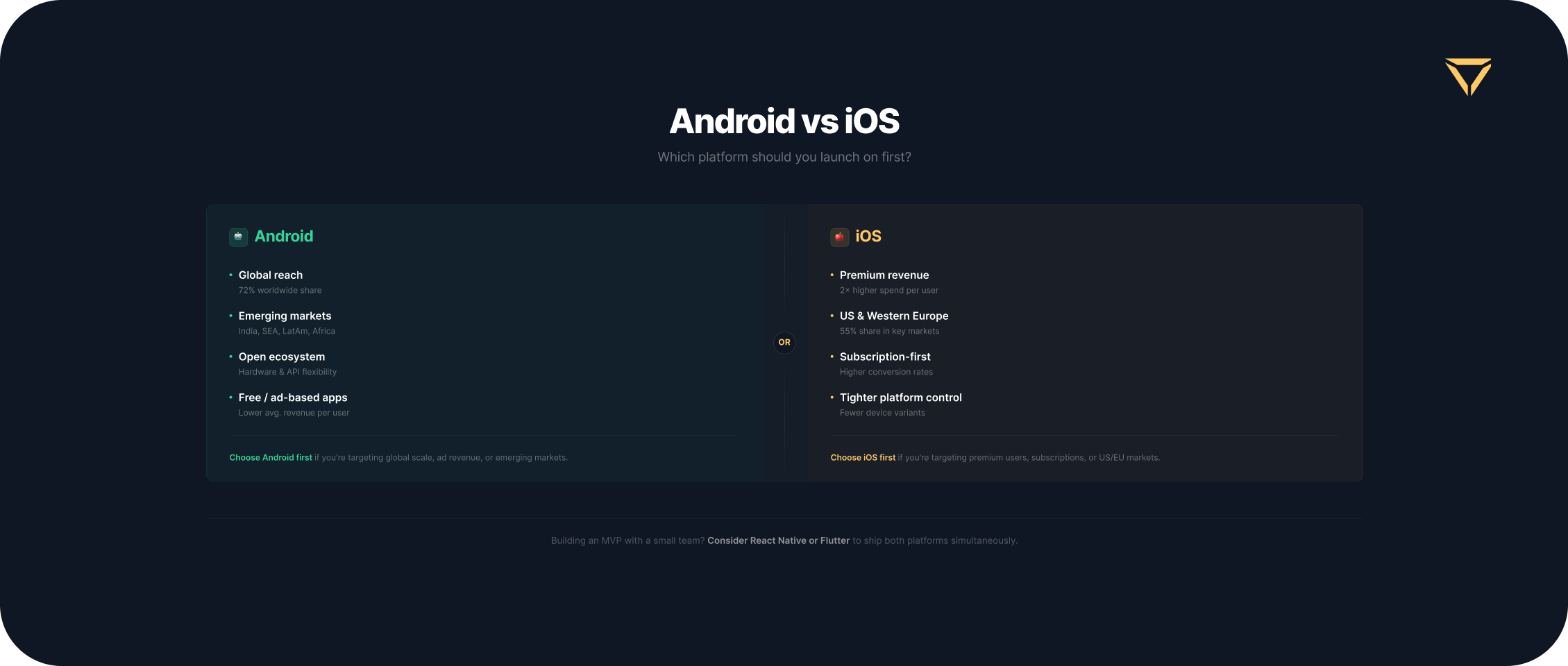
When planning a new mobile product, one of the first strategic decisions you may face is deciding between platforms. The statistics present an interesting paradox. According to StatCounter, Android dominates the global mobile operating system market with a share of roughly 71–72%. However, data from Sensor Tower reveals that iOS accounts for 65–70% of total global app revenue, despite holding only about 28% of the market.
A business decision in relation to Android and iOS app development is essential to the app’s budget, time-to-market, and long-term scalability. The wrong strategy can lead to inflated costs and delayed launches. Moreover, you can miss your core audience, who will choose other apps.
In this guide, we bypass vendor bias and provide a clear comparison of native and cross-platform approaches. We will break down the differences in programming languages, development environments, and budgets. Finally, we will share a 5-factor decision framework to help you choose the platform strategy that will help in achieving your startup's business goals.
Android vs iOS: Market Overview
Before diving into technical frameworks or codebases, you must define where your target users are located and how they spend their money. The debate surrounding Android vs. iOS development may start with market dynamics.
Global and Regional Market Share
Globally, Android holds the dominant market share. However, this distribution varies across different regions. In the United States and Australia, iOS maintains a strong market position. It often gets over half of the user base. In the United Kingdom, the platforms are much closer to parity. Still, Android remains the key platform for reaching global consumers and benefiting from emerging markets.
To achieve global reach with an Android app in certain regions such as China, developers must enter alternative marketplaces. In these regions, Google services are restricted, so you need to go far beyond the Google Play Store.
This is also true if you want to fully capitalize on specific device ecosystems. So, you should deploy your app to the Huawei AppGallery, Samsung Galaxy Store, and Xiaomi GetApps. Managing multiple storefronts, distinct billing SDK integrations, and varied review guidelines adds an extra layer of operational complexity to the Android deployment pipeline. Consider this when planning the launch of your app.
App Revenue and Monetization
A larger market share does not bring higher revenues automatically. iOS users usually spend more on digital purchases and subscriptions. They download premium apps more often. That is why Apple's App Store accounts for the majority of global app revenue. If your strategy relies on upfront paid downloads, iOS often yields a faster ROI. The same is true for in-app purchases. However, Android users show a higher inclination towards ad-supported models and freemium apps.
The platform choice for ad-supported apps has changed because of privacy frameworks. After the introduction of Apple’s App Tracking Transparency (ATT), user opt-in rates for IDFA tracking significantly dropped. The approximate reduction is from 100% to roughly 25% on iOS devices. This shift has negatively influenced ad-targeting precision and lowered effective CPMs for publishers on Apple devices. So, if your platform strategy relies on mobile advertising revenue, start with an Android-first approach. It provides more data and better initial monetization efficiency.
When you plan your monetization strategy, pay attention to store commissions. This can influence the decision of choosing iOS or Android first. For instance, the Apple Small Business Program reduces the standard 30% App Store cut to 15% for those developers who generate less than $1 million in annual revenue. This provides financial runway for early-stage startups.
Regulatory shifts have created new regional opportunities. For example, iOS permits alternative marketplace distribution and alternative payment systems according to the European Union's Digital Markets Act (DMA). This is beneficial for subscription-based apps that want to bypass traditional store fees. Google Play also has flexible billing options in the EU that allow businesses to reduce service fees to as low as 11%. Consider these local regulations and developer programs when crafting your platform strategy. This will be helpful in producing a cash flow forecast.
User Demographics and Behavior
Demographic data from DemandSage reveals that iOS users tend to have higher average incomes. This makes them more likely to make in-app purchases and subscribe. Moreover, they are much quicker to adopt the latest operating system updates. This rapid OS adoption rate simplifies the quality assurance (QA) process for developers. Android offers broad reach and diversity, capturing a broader socioeconomic range across thousands of device models.
Understanding these nuances contributes to the success of mobile app development. Your choice determines both the coding and capturing of the target audience. If your product targets high-income users in North America, an iOS-first strategy might make the most sense. If you are building a scalable tool for mass adoption across Europe, Android is indispensable.
Key Differences Between Android and iOS Development
Understanding the technical and operational differences is important if you need to choose between Android vs iOS app development. They may influence your hiring tactics, development time, and maintenance costs. The table below shows the core technical distinctions between these two options.
| Feature | iOS Development | Android Development |
| Programming language | Swift for modern apps, Objective-C for legacy | Kotlin for modern apps, Java for legacy |
| IDE (environment) | Xcode for macOS only | Android Studio (Windows, macOS, Linux) |
| Design guidelines | Human Interface Guidelines | Material Design |
| App Store review | Strict, comprehensive. Takes 1-3 days. | Fast, automated-first. Takes from several hours to more than 1 day. |
| Device fragmentation | Low Dozens of standard models | High Thousands of device variations |
| Monetization model | Premium apps, in-app purchases | Ad-supported, freemium models |
Programming Languages: Swift/Objective-C vs Kotlin/Java
The basis of any native mobile application is its codebase. For iOS, Swift is the modern standard, having largely replaced the legacy Objective-C. Swift is fast, safe, and heavily optimized for the Apple ecosystem. In Android development, Kotlin is the official language endorsed by Google. It is replacing Java as the modern standard.
When comparing Swift vs Kotlin, you will find that both languages are modern, statically typed. They offer excellent performance and developer ergonomics. Still, the choice between them will influence your hiring process. The market for senior Swift and Kotlin developers is highly competitive. Finding a dual-expert is more difficult, which means building for both platforms natively requires hiring two distinct engineering roles. This directly impacts the budget and timeline for your iOS and Android app development language strategy.
Development Environment & Tools
The Integrated Development Environment (IDE) determines the hardware your team needs. iOS apps are built using Xcode, Apple’s proprietary IDE. The critical business constraint here is that Xcode only runs on macOS. You cannot natively compile an iOS application on a Windows or Linux machine. This requires upfront investment in Apple hardware for your entire iOS engineering team.
Conversely, Android Studio is a cross-platform IDE. It runs on macOS, Windows, and Linux. This flexibility allows developers to use their preferred operating systems and can slightly lower hardware costs. Understanding the constraints of an environment is essential to Android app development and iOS app development planning. Still, it is especially important when scaling a remote team.
Design Guidelines: Human Interface vs Material Design
Users of these platforms have different expectations. Apple’s Human Interface Guidelines emphasize clarity, deference, and depth. They focus on flat design elements, translucent navigation bars, and system-standard typography. Google’s Material Design relies on a paper-and-ink metaphor, utilizing shadows, vibrant colors, and distinct elevation to guide the user.
A successful iOS and Android app development project should respect these conventions. Porting an exact replica of an iOS interface to Android, or vice versa, creates a disjointed user experience. Such elements as back-button behavior, tab bar placement, and settings menus must feel native to the user's OS. A robust UI/UX design phase is important for translating your brand identity across these divergent platform rules.
App Store Review: Apple's Strictness vs Google's Speed
Store review policies greatly influence release and its planning. The Apple App Store is especially strict. Human reviewers thoroughly check apps to evaluate observance of privacy standards, design guidelines, and performance indicators. The rejection rate can be substantial. For instance, data from the App Store Transparency Report revealed that out of roughly 6.1 million app submissions reviewed in a single year, nearly 1.7 million were rejected. So, the overall rejection rate of that year was about 27%. The review usually takes 1 to 3 days.
Google Play adopts a more liberal, automated-first approach. Initial submissions and updates are often approved within several hours. Recently, Google has tightened its data safety policies as well. Still, its review process remains faster. Adhering to app development best practices includes factoring these review timelines into your CI/CD pipeline and go-to-market strategy. As a result, the marketing launches will align with app availability.
The pre-launch beta distribution pipeline also differs for iOS and Android. This directly impacts your QA timeline. Apple’s TestFlight requires a formal, albeit accelerated, review process when distributing builds to external testing groups. This can lead to minor bottlenecks during rapid iteration.
Conversely, Google Play Internal Testing allows engineering teams to deploy new builds to internal tracks instantly without any automated or manual store review. Consider these different beta pipelines when planning your sprints. This is essential for maintaining a predictable QA and release cadence.
Device Fragmentation
One of the biggest differences between Android and iOS is fragmentation. Apple keeps tight control over iOS devices. It is releasing only a few new models each year. Most users quickly update to the newest operating system, which makes testing and quality checks much easier.
When choosing Android vs. iOS development, remember that with Android, you may face a huge challenge with fragmentation. Your app needs to work on thousands of device variations, each with its own screen size, shape, hardware, and manufacturer-specific features. Because of this, you need a larger testing budget and more time to ensure your app works well everywhere.
Three Development Approaches: Native, Cross-Platform & Hybrid
Deciding how to build your app is just as critical as deciding where to launch it. The industry generally categorizes development into three distinct paths.
Native Development (Swift/Kotlin)
Native app development involves writing code for a single OS, using its languages and tools. For a dual-platform launch, this means maintaining two entirely separate codebases. One of them should be written in Swift for iOS, and the other in Kotlin for Android.
For modern native development, engineering teams have completely moved away from legacy imperative UI layouts. Today, they rely on declarative UI frameworks — SwiftUI for iOS and Jetpack Compose for Android — which have vastly streamlined frontend coding, improved rendering performance, and made native codebases more maintainable.
The main advantage is excellent performance. Native apps have direct access to the latest OS-level APIs, advanced camera features, and hardware sensors. They allow users to enjoy the great animations and the most authentic user experience.
However, the downside is cost and time. Building two native apps significantly increases the development effort. This native iOS and Android app development approach is effective for compute-heavy applications, such as augmented reality (AR) and 3D gaming.
Cross-Platform (React Native, Flutter, Kotlin MP)
Cross platform app development allows you to write a single codebase that deploys to both iOS and Android. Frameworks such as React Native and Flutter have been significantly improved, enabling near-native performance. While these frameworks remain the dominant choices for shared code, the current landscape includes mature tools such as Kotlin Multiplatform (KMP) and Compose Multiplatform. Backed by JetBrains and Google, KMP has emerged as the fastest-growing cross-platform solution. Unlike traditional frameworks that abstract the entire OS, KMP focuses on sharing pure business logic, data layers, and networking code. At the same time, it leaves the UI 100% platform-native (using SwiftUI and Jetpack Compose). Alternatively, teams can leverage Compose Multiplatform to share declarative UI components across Android and iOS. This architecture-first approach eliminates performance overhead and makes KMP highly popular among enterprise teams and scaling startups that refuse to compromise on native performance.
The business benefits are evident, since a single team can ship to both platforms simultaneously. This significantly reduces time-to-market. Certain deeply integrated OS features might still require custom native modules. Still, the vast majority of application logic is shared.
Another advantage of cross-platform development that directly impacts post-launch iteration speed is the support for OTA updates. Following the deprecation of Microsoft CodePush, tools like EAS Update have become the industry standard for React Native projects.
This technology allows engineering teams to deploy critical bug fixes, content updates, and minor UI adjustments instantly to users' devices. It allows bypassing the traditional App Store and Google Play review queues. This also reduces maintenance overhead and allows startups to fix critical production issues very quickly.
When evaluating React Native vs Flutter, React Native relies on JavaScript/TypeScript, thus leveraging a massive web developer ecosystem. Alternatively, Flutter uses Dart to paint its own highly customizable UI components. For most fintech apps, SaaS, and marketplace projects, we use React Native. This reduces the timeline by approximately 40% compared to building two native apps.
Hybrid Apps (Capacitor, PWAs & WebView Wrappers)
Traditionally, hybrid apps were defined as web applications packaged within a native mobile container using legacy frameworks such as Apache Cordova. Today, the hybrid landscape has completely evolved, and the line between "cross-platform" and "hybrid" is blurring. The modern successor to Cordova is Capacitor, an open-source native runtime created by Ionic. Capacitor allows developers to wrap standard web applications built with React, Vue, or Angular into a native mobile shell. Since it provides direct hooks into native APIs, its performance ceiling is significantly closer to React Native than that of older hybrid tools.
Another shift in this category is the rise of Progressive Web Apps (PWAs) and advanced WebView wrappers. PWAs represent a modern alternative to traditional hybrid development. They eliminate the need for a native app store shell altogether. PWAs can successfully deliver offline functionality, push notifications, and app-like experiences with a single web codebase. This is demonstrated by the mobile experience of high-profile products like Twitter Lite, the Starbucks PWA, and Notion, installed directly from a web browser.
Tech giants frequently use hybrid WebView architectures to improve feature agility. For instance, platforms like Slack and Discord rely on embedded web views inside their mobile apps. They are needed to share substantial amounts of frontend code between their desktop and mobile clients. This hybrid/web-first approach is highly budget-friendly and ensures instant web-to-mobile feature parity. Still, it can introduce minor gaps in user experience, particularly in navigation and device-heavy background processing.
Comparison Table: Native vs Cross-Platform vs Hybrid
| Feature | Native | Cross-Platform | Hybrid |
| Performance | Excellent Maximum speed | Very Good Near-native | Moderate WebView based |
| Development Time | Slowest Two codebases | Fast Single codebase | Fastest Web technologies |
| Cost to Build | Highest | Moderate | Lowest |
| UX/UI | Authentic platform | Highly customizable | Often feels like a website |
| Best For | AR/VR, Heavy Data, Gaming | Startups, SaaS, E-commerce | Internal tools, simple content |
Need help in choosing native vs. cross-platform?
Schedule a consultation with our mobile architects to evaluate your specific use case.
Cost Comparison: Native iOS, Native Android, Cross-Platform
Budget is frequently the deciding factor in choosing a platform strategy. To understand the Android and iOS app development cost, you need to consider the scaling of development effort. Focusing just on absolute figures would be misleading, as hourly rates vary wildly by region and feature complexity.
If you choose to build for both platforms natively, the total cost does not simply double. You get synergies across backend architecture, API design, UI/UX planning, and project management. This makes dual-native development a better choice than building two isolated projects.
Choosing cross-platform development allows your team to maintain one shared codebase. The total cost to launch on both platforms is lower than building two native apps. The main financial advantages stem from reduced engineering hours and a unified QA process within a single ecosystem. Moreover, you will be able to work with a single, consolidated team rather than hire separate Swift and Kotlin specialists.
Development budgets may vary depending on features, third-party integrations, and architectural choices. If you want a deeper understanding of how these factors affect project duration, review our article on how long it takes to build an app. For most startups embarking on mobile app development for iOS and Android, a cross-platform approach offers an optimal balance among cost-effectiveness, time-to-market, and product quality.
The widespread integration of AI-assisted coding tools, such as Cursor, GitHub Copilot, and specialized LLMs, has improved engineering efficiency. AI accelerates boilerplate code generation, UI prototyping, and routine refactoring for both native and cross-platform streams. It reduces the hours spent on coding. Still, it does not eliminate the need to manage separate codebases. Therefore, the decision between native and cross-platform development should rely on QA complexity, fragmentation, and maintenance constraints.
How to Choose: A 5-Factor Decision Framework
A choice between iOS and Android app development requires a structured approach that allows for comparing the benefits and drawbacks of each. Instead of guessing, run your product idea through this 5-factor decision framework to follow app development best practices.
- Target Market Geography: Where are your early adopters? If targeting the US, the UK, or high-income users, you might launch natively on iOS first. If targeting global or emerging markets, cross-platform development will be a better choice. It will allow you to immediately capture the Android user base.
- Budget and Timeline Constraints: How much runway do you have? If you need to validate a concept quickly to raise a Seed round, cross-platform development with React Native will be the optimal choice. It ships faster and burns less cash.
- Performance Requirements: What does the app actually do? Choose native development if your app deals with large volumes of real-time video, performs 3D rendering, or integrates advanced hardware. Cross-platform development may be sufficient for e-commerce platforms, simple CRUD apps, and fintech dashboards.
- Current Team Expertise: Do you have an in-house team? If you already have a team of strong React/Web developers, transitioning to React Native is very efficient. If you lack a team, you will need to evaluate external dedicated team options.
- Long-Term Maintenance Strategy: How will you handle updates? Maintaining two native codebases means doubling your ongoing bug-fixing and feature-release efforts. A single cross-platform codebase significantly lowers long-term Total Cost of Ownership (TCO).
See how Stubbs builds mobile apps for both iOS and Android. Explore our mobile development expertise.
Best Practices for Building Apps on Both Platforms
Regardless of the approach you choose, adhering to app development best practices provides a smoother launch and a better user experience.
- Adopt a Shared Design System. Create a unified design language that respects platform policies. For example, you can use a single design system with platform-specific adaptations and vary the navigation bar styling for iOS vs. Android.
- Parallel Development Streams. If building natively, ensure the iOS and Android teams work in parallel sprints. Staggered development often leads to feature disparity and API integration bottlenecks.
- Platform-Specific QA Strategy. Do not treat Android and iOS testing equally. Allocate extra time for device fragmentation testing on Android, and focus on OS version compatibility for iOS.
- Implement Robust CI/CD. Set up Continuous Integration and Continuous Deployment pipelines specifically tailored to handle Xcode build processes and Android Gradle builds simultaneously.
- Manage Feature Parity Wisely. Aim for feature parity, but do not force it if it breaks native conventions. It is acceptable for an iOS app to use a specific Apple-only feature, such as Face ID. Android uses its equivalent biometric prompt.
- Unified Analytics Setup. Implement analytics tools that segment data by OS. This allows product managers to understand behavioral differences between iOS and Android cohorts.
- Strict Privacy Compliance. Stay ahead of platform rules. Ensure strict adherence to Apple’s App Tracking Transparency (ATT) framework and Google Play’s Data Safety requirements. This helps reduce the risk of app store rejections.
Common Mistakes That Hurt Cross-Platform Projects
Poor development practices can weaken your iOS and Android app development efforts, even if you use the best tools. Avoid these mistakes to achieve success in launching your app.
- Developing Without Market Validation. Don’t build a massive application for both platforms simultaneously without first validating the core concept with real users. Such a practice often results in wasted capital.
- Cloning UI Across Platforms. Forcing an iOS interface on Android users, and vice versa, creates certain friction. Ignoring platform-specific navigation guidelines is the fastest way to earn negative store reviews.
- Ignoring Platform Guidelines. Bypassing Apple’s Human Interface Guidelines or Google’s Material Design rules will annoy users. This can also lead to outright rejection during the App Store review process.
- Developing iOS Without a Mac. Startups sometimes attempt to build cross-platform apps without investing in a macOS machine. Still, later they realize that Xcode is strictly required to compile and sign the final iOS build for the App Store.
- Skipping Real Device Testing. Do not rely solely on software emulators, as this is a huge mistake. It can spoil app development best practices. Emulators cannot fully replicate hardware constraints, battery drain, or thermal throttling.
- Mishandling Push Notifications. Treating notifications uniformly often fails. Developers must account for the architectural differences between Apple Push Notification Service (APNs) and Firebase Cloud Messaging (FCM).
Real-World Examples: When We Chose Each Approach
Theoretical guidelines are helpful for outlining the future project. Still, real iOS and Android app development services require pragmatic choices that should be based on business realities. Here is how we approached platform selection for our clients when working on certain apps. You can explore their details in our project portfolio.
Flymingo: Speed to Market with React Native
Flymingo is an innovative flight booking application. The client needed to reach both iOS and Android users quickly to validate their business model. We chose React Native to create a high-performance cross-platform app. This allowed us to maintain a single codebase and reduce the time-to-market. As a result, the client was able to allocate more of its budget toward complex backend integrations rather than duplicate UI development.
OnTrack: Validating the Market with a Web-First Strategy
OnTrack is a fitness platform devoted to smart weight-tracking and predictive analytics. As an early-stage startup, the client needed to quickly validate their core product with real users across all devices. Building native iOS and Android apps would have delayed time-to-market and consumed a lot of their initial budget.
We deliberately chose a web-first approach. By utilizing Next.js and Node.js, we were able to focus on responsive user experience. Instead of fighting mobile OS constraints, our team of four engineers ensured that the intricate interactive dashboards and caloric deficit graphs displayed flawlessly on any mobile or desktop screen resolution.
In just five months, the client received a fully functional platform. It was ready for beta testing and investor pitches. They avoided the massive overhead of dual native development and preserved their capital. As a result, they have a scalable foundation to validate their market fit and integrate future B2B expansions before starting native mobile app development.
Myntkaup: Maximizing Code Reuse with React Native and Expo
Myntkaup is Iceland’s leading regulated cryptocurrency exchange. The technical challenge was to build a mobile application alongside their existing web platform, a task that required implementing complex financial calculations. In particular, matching trades with historical exchange rates for the Profit & Loss (PNL) tracking system and handling varying decimal formats across different altcoins.
We used React Native and Expo because the client’s web architecture was already built on React and Node.js. The JavaScript ecosystem enabled the reuse of core business logic across all platforms.
We have chosen React Native Skia to address the performance limitations often associated with cross-platform frameworks. This allowed for rendering the heavy, interactive PNL charts. We also used Expo’s native modules to securely perform electronic ID sign-ups and device-specific biometric authentication.
By avoiding duplicate native development, the engineering team delivered a secure, multi-platform trading experience with a unified codebase. The application currently serves over 20,000 users and holds the #1 ranking in the App Store’s finance category in Iceland.
Conclusion
There is no single perfect platform for your app. But you need to make the right choice for your business context and tasks. When comparing Android and iOS app development, your decision must balance different aspects. The main considerations are target demographics, timeline, budget, and long-term maintenance.
Native development offers great performance at a high cost. It is suitable for advanced apps. Hybrid approaches work well for basic enterprise needs with a strict budget. However, for startups, SaaS products, and fintech platforms, cross-platform development is a good choice. It excels in speed and cost efficiency.
Ready to build your app?
Get expert guidance on your platform strategy. Book a free consultation today.
FAQs
1. Is it better to develop for iOS or Android first?
Is it better to develop for iOS or Android first?
It depends on who you want to reach and how you plan to get your revenue. iOS users usually spend more. This is why iOS is often chosen for the US, the UK, or Australia. Android has a wider global audience. It works well for scaling in Europe, Asia, and Latin America.
2. Can I develop one app that works on both Android and iOS?
Can I develop one app that works on both Android and iOS?
Yes, using cross-platform frameworks such as React Native, Flutter, or Kotlin Multiplatform allows you to develop one app. In such a case, you will write a single codebase that deploys to both operating systems. This approach can save you up to 40% in development costs compared to building two separate native apps.
3. What languages are used for iOS and Android development?
What languages are used for iOS and Android development?
For native development, iOS relies mainly on Swift and legacy Objective-C. Android uses Kotlin and legacy Java. If you choose cross-platform development, you may use JavaScript/TypeScript programming languages for React Native or the Dart language for Flutter.
4. How much more does it cost to develop for both Android and iOS?
How much more does it cost to develop for both Android and iOS?
Building natively for both platforms simultaneously costs approximately 1.7-1.9× as much as building for a single platform. In contrast, using a cross-platform framework may cost 1.1× to 1.2× as much as a single native app. The significant price difference can be explained by the choice between maintaining separate codebases and a shared one.
5. Which is harder to develop: iOS or Android?
Which is harder to develop: iOS or Android?
Both platforms offer some difficulties. iOS development assumes following Apple’s strict design guidelines and rigorous App Store review processes. Android development is hard because of high device fragmentation. It requires more testing to prove the work on thousands of different screen sizes and hardware configurations.
6. What is the difference between native and cross-platform development?
What is the difference between native and cross-platform development?
Native development involves building exclusively for one platform using its specific tools. Still, it results in maximum performance and an authentic feel. Cross-platform development uses a single codebase to ship to both iOS and Android simultaneously, offering a much faster time-to-market with a slightly lower performance ceiling.
7. Do I need a Mac to develop iOS apps?
Do I need a Mac to develop iOS apps?
Yes, a Mac is necessary for native iOS development because Xcode, the official IDE, only runs on macOS. You can write cross-platform code on Windows or Linux. Still, you will ultimately need a macOS machine to compile the final build, sign it, and publish it to the Apple App Store.
Jul. 31, 2026
16 min to read