View all
Web DevelopmentMobile Development UX/UI DesignStaff Augmentation CTO as a ServiceDedicated TeamLow-Code DevelopmentWhy Use TypeScript for Large Web Applications?
Technology

Aug. 26, 2026
19 min min to read

Table of Contents
What Is TypeScript in Simple Terms?
Why Large Web Applications Become Hard to Maintain
Main Benefits of TypeScript for Large Web Applications
JavaScript vs TypeScript for Large Applications
Where TypeScript Helps Most in a Web Application
What TypeScript Does Not Solve
When TypeScript May Not Be Worth It
TypeScript for React and Next.js Applications
Should You Start with TypeScript or Migrate Later?
TypeScript Best Practices for Large Web Applications
How TypeScript Impacts Business Outcomes
Examples from Our Work
Do You Need TypeScript for Every Web Application?
When to Hire a TypeScript Development Team
TypeScript is useful for large web applications by adding static type checking to JavaScript. This lets teams find type-related mistakes sooner, refactor code more confidently, and keep complex projects easier to manage as they grow.
It does not replace JavaScript, and you still need testing, code reviews, runtime checks, and solid architecture. But when a web app has many developers, shared components, API contracts, user roles, integrations, and long-term goals, TypeScript can make daily development more predictable.
For small prototypes or simple scripts, JavaScript is often enough. But for large web applications, TypeScript is less about syntax and more about reducing long-term development risks.
This is also where the market has moved. In the State of JavaScript 2024 survey, 67% of respondents said they write more TypeScript than JavaScript, while the largest single group reported writing only TypeScript. This does not mean every project needs TypeScript, but it shows how common typed JavaScript development has become in modern frontend and full-stack teams.
What Is TypeScript in Simple Terms?
TypeScript is JavaScript with an additional type system. It lets developers describe what kind of data a function, object, component, or API response should work with.
The browser or Node.js still runs JavaScript. TypeScript checks the code before it runs and then compiles to JavaScript. The official TypeScript documentation describes it as a static type checker for JavaScript programs, which means it can detect many type-related issues before runtime.
One key thing to remember is that TypeScript does not change how JavaScript works when your code runs. After checking your code, TypeScript removes the types and leaves you with plain JavaScript. So, you can think of TypeScript as a safety tool for developers, not a new runtime or framework.
For example, in JavaScript, a function may expect a user object with an email field, but nothing stops another part of the application from passing an object without that field. The problem may only appear when the user opens a specific page or submits a specific form.
In TypeScript, the expected structure can be described upfront. If another developer passes the wrong object, the editor or compiler can highlight the issue earlier.
That does not mean TypeScript catches every bug. It does not understand all business logic, user behavior, third-party API failures, or runtime data. Its value is narrower but very important: it makes the shape of data more visible and helps developers avoid a large class of avoidable mistakes.
Why Large Web Applications Become Hard to Maintain
A small application can often survive with informal knowledge. One or two developers know where everything is, how the API works, which fields are optional, and which components expect which props.
A large web application is different.
It may include dozens of pages, reusable UI components, dashboards, forms, permissions, payment states, API integrations, admin panels, and several user roles. It may also have multiple developers working on the same codebase at the same time.
This is not just a theoretical problem. According to the State of JavaScript 2024 survey, code architecture becomes the biggest challenge as codebases grow, with state management and dependency management close behind. Many teams see this too: building the first feature is easy, but keeping the codebase clear after many updates is much harder.
In that environment, small changes might have unexpected consequences.
A backend field changes from:
user.name
to:
user.fullName
A payment status gains a new value.
A dashboard filter becomes optional.
A reusable component starts requiring a new prop.
A third-party integration returns a slightly different response.
In a JavaScript codebase, these changes can be easy to miss if tests are incomplete or the affected flow is not checked manually. In TypeScript, many of these problems can surface during development because the contract between different parts of the application is explicit.
This is why TypeScript development becomes more valuable as a product grows. The main question is not “Can we build this in JavaScript?” Of course, you can. The better question is: “How easy will it be to change this application safely six months from now?”
Main Benefits of TypeScript for Large Web Applications
Earlier Error Detection
One of the clearest benefits of TypeScript is that it can catch type-related mistakes before the application runs.
This includes problems such as:
- passing the wrong argument to a function;
- using a missing property;
- returning the wrong data shape;
- passing incorrect props to a component;
- treating a value as always available when it can be undefined;
- using a string where the code expects a number or preset status.
In a small codebase, these mistakes may be easy to find. In a large product, they can hide inside edge cases, admin flows, specific user roles, or rarely used integrations.
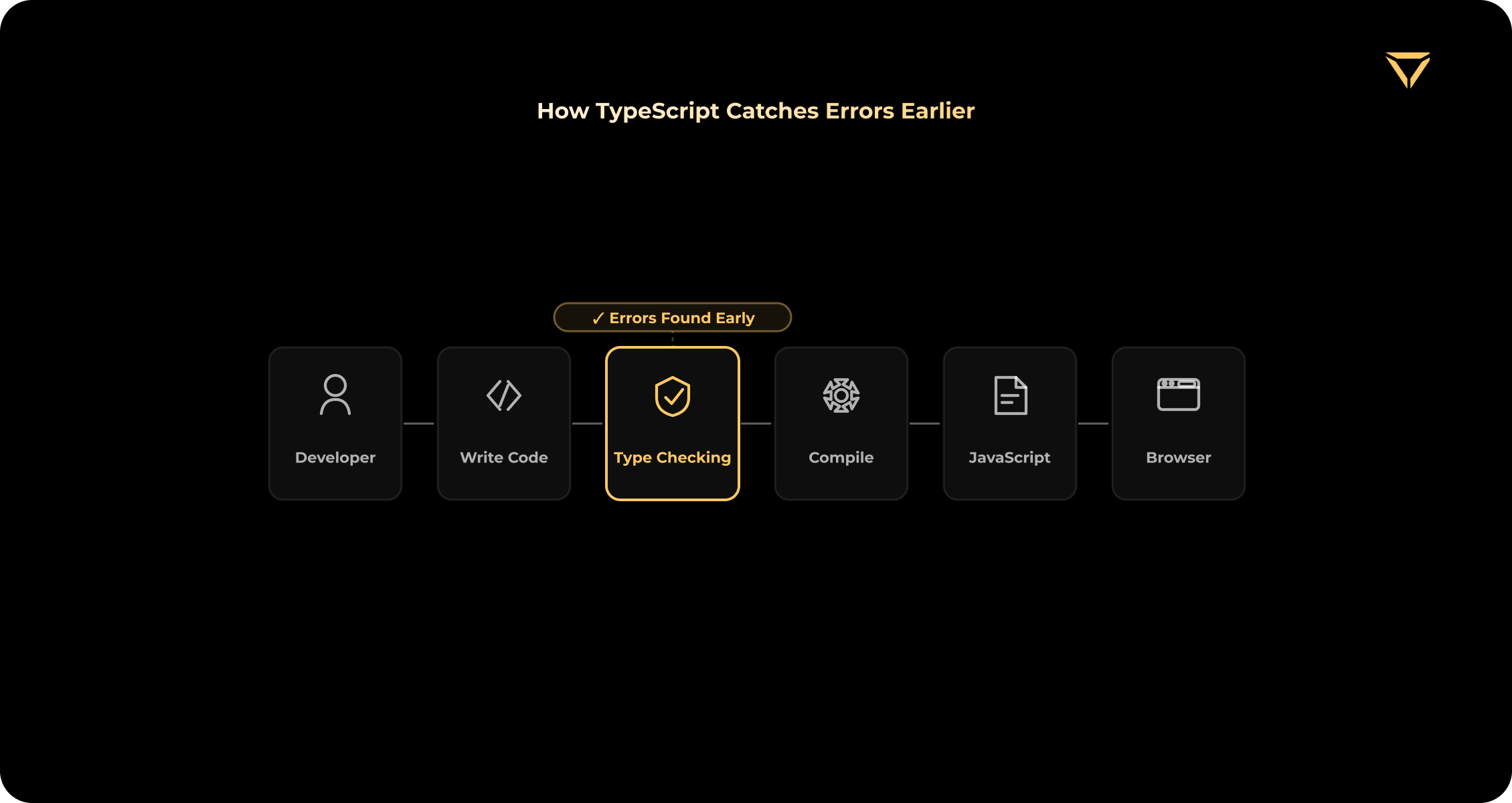
TypeScript does not guarantee that the application will work correctly. It only checks what it can understand through types. But even that is useful because many production issues start with simple differences between what one part of the code sends and what another part expects.
Safer Refactoring
TypeScript is especially helpful when you need to refactor your code. Large web applications are always changing. Teams often update user models, billing logic, permissions, forms, navigation, integrations, and dashboard data. Without types, developers usually depend on search, memory, tests, and manual QA to figure out what a change affects.
TypeScript gives the team a map of dependencies.
If a developer changes a shared type, function signature, API response, or component prop, TypeScript can show where the old contract is still being used. That makes refactoring less dependent on guesswork.
This matters because large applications usually have many hidden connections. A small change in a shared helper, API client, or design system component can affect dozens of screens.
TypeScript does not make refactoring risk-free, but it makes the risk easier to see.
Clearer Contracts Between Teams
In a large product, different people often work on different layers of the application. One developer builds backend endpoints. Another builds the frontend dashboard. Another manages the design system. Another works on billing or integrations.
TypeScript helps create clearer contracts between these layers.
For example:
- User
- Invoice
- PaymentStatus
- SubscriptionPlan
- Order
- Permission
- Workspace
- Notification
When models use types, developers know exactly which fields are available, what values are allowed, and what each component needs.
This is especially helpful for teams working on the frontend and backend at the same time. A typed API contract makes it easier to avoid confusion about response formats, optional fields, error handling, and user permissions.
It also helps new developers understand the product faster. Instead of asking someone what an object looks like, they can inspect the type and see the expected structure directly in the codebase.
Better Developer Experience
TypeScript improves the everyday experience of working in a large codebase.
Modern editors can use types to provide better autocomplete, go-to-definition, inline documentation, safer renaming, and faster navigation. That means developers spend less time searching through files and more time understanding how the system is connected.
This is useful for onboarding. A new developer joining a large JavaScript codebase often has to learn many hidden rules from existing team members. In a TypeScript codebase, more of those rules are visible in the code itself.
For example, if a component expects a specific set of props, the developer can see it immediately. If a function returns a specific result type, the editor can show it. If a status only allows certain values, TypeScript can prevent unsupported values from being used.
This does not replace documentation, but it reduces the amount of knowledge that exists only in someone’s head.
More Predictable Component Development
Large web applications commonly rely on reusable components: buttons, modals, tables, filters, forms, sidebars, cards, charts, and dashboard widgets.
In JavaScript, it can get unclear what a component expects over time. One developer might pass a string when someone else expected an object. Sometimes, a required prop is forgotten, or a component gets a status it was not built to handle.
TypeScript makes component contracts more explicit.
This is especially useful in React and Next.js applications, where modules are reused across many pages and product areas. React’s official documentation includes a dedicated guide for using TypeScript with React, while TypeScript itself supports JSX patterns used in React codebases.
For example, a dashboard table component might need typed columns, filters, row actions, loading states, empty states, and user permissions. As you make the component more reusable, unclear props can cause more problems. TypeScript helps keep things manageable.
Easier Long-Term Maintenance
TypeScript’s real benefits usually show up after the first release. Web apps often last for years. Features change, team members come and go, and business logic gets more complicated. Integrations change too. Your product might grow from an MVP to a SaaS platform, from a simple dashboard to a system with many roles, or from serving one market to supporting several countries.
In this environment, keeping the code easy to maintain is more important than building it quickly at first.
TypeScript helps by making key assumptions clear. It shows what data should look like, what values to expect, and how different parts of the code depend on each other.
This makes it easier to update old features, add new ones, and avoid breaking parts of the product that haven’t been touched in a while.
JavaScript vs TypeScript for Large Applications
JavaScript is not a bad choice. It is flexible, widely used, and often faster to start with. For prototypes, small websites, scripts, and simple applications, JavaScript can be completely practical.
The trade-off changes when the product grows.
| Setup | Simpler | Requires configuration |
| Initial speed | Often faster for small projects | Slightly slower upfront |
| Type checking | Mostly manual, runtime, or test-based | Compile-time type checking |
| Refactoring | More dependent on search and tests | Safer with compiler and IDE support |
| Team collaboration | Depends heavily on documentation | Supported by explicit contracts |
| Large codebase maintenance | Can become harder over time | Easier when types are well-designed |
| Best for | Prototypes, scripts, small apps | Large apps, long-lived products, teams |
The decision should not be based on hype. It should be based on product size, expected lifetime, team structure, and the cost of mistakes.
If the application is small and will not change much, TypeScript may feel like overhead. If the application is expected to grow, the upfront effort can be worth it.
Where TypeScript Helps Most in a Web Application
API Clients and Backend Contracts
Many large web applications depend on APIs. The frontend sends requests, receives responses, handles loading states, shows errors, and updates the UI based on backend data.
TypeScript helps define the expected structure of this data.
For example:
UserProfile
Transaction
Invoice
Booking
Product
Notification
PaymentStatus
When these models are typed, frontend developers can work with API data more confidently. They can see which fields are required, which are optional, and what values are expected.
However, there is one important limitation. TypeScript does not check if external data is correct while the app is running. If a third-party API sends unexpected data, TypeScript will not protect your app unless you validate that data yourself.
For important data, it’s best to use TypeScript along with runtime validation tools and tests.
React and Next.js Components
TypeScript is especially helpful in React and Next.js projects because big frontend apps often use shared components and repeat the same UI patterns.
In React, TypeScript helps with:
- component props;
- hooks;
- event handlers;
- form state;
- context;
- reusable UI components;
- loading and error states;
- design system components.
In Next.js, TypeScript can help with route-related data, server-side data, API routes, metadata, shared models, and frontend-backend consistency. Next.js comes with built-in TypeScript support and includes a custom TypeScript plugin and type checker for editor support.
This is useful because Next.js applications often combine frontend, backend, server-side rendering, API logic, and integrations in one product. Types help keep these parts more predictable.
For business teams, this matters because TypeScript is not an exotic add-on anymore. It is part of the normal tooling around modern React and Next.js development, especially for products with reusable components, shared models, API routes, and long-term maintenance plans.
Complex Forms
Forms are one of the easiest places for large applications to become messy.
A simple form may only have a few fields. A production form may include conditional fields, nested values, validation states, permissions, saved drafts, backend errors, uploaded files, and different behavior for different user roles.
TypeScript helps describe the shape of form data and the states the form can be in.
For example:
Draft
Valid
Submitting
Submitted
Failed
or:
IndividualUser
CompanyUser
AdminUser
This helps developers avoid using fields that may not exist or ignoring states that need to be handled.
But TypeScript does not replace form validation. A user can still submit invalid data. A browser can still send unexpected values. An API can still receive a malformed payload. Runtime validation is still required.
Shared Design Systems
Large teams often create a shared design system or UI library.
This can include buttons, inputs, modals, tables, cards, layouts, icons, navigation components, and form elements. These components may be used across dozens or hundreds of screens.
TypeScript helps make shared components safer to use. If a component supports only certain variants, sizes, or states, those options can be typed. If a modal requires a title and action handler, the component contract can make that clear. If a table expects a specific row format, developers can see it directly. This reduces inconsistent usage and makes the UI library easier to maintain.
State Management
Large applications usually have complex state.
This may include:
- current user;
- permissions;
- feature flags;
- filters;
- search results;
- selected items;
- cached API data;
- loading states;
- error states;
- form drafts;
- payment steps.
Without types, state can become difficult to understand. Developers may not know whether a value can be null, whether a list is already loaded, or whether a permission is available for a specific user role.
TypeScript helps make these states explicit.
This is useful not only for preventing errors but also for making the application easier to reason about.
Monorepos and Shared Packages
Some large products use monorepos or shared packages between frontend and backend applications.
TypeScript can help synchronize shared types across packages. For example, a team may share models for users, billing plans, permissions, or API responses.
This can reduce duplication, but it must be done carefully. Shared types should not create tight coupling between parts of the system that need to change independently.
TypeScript helps, but architecture still matters.
What TypeScript Does Not Solve
TypeScript is useful, but it is not a complete quality strategy.
It does not replace:
- product architecture;
- runtime validation;
- automated tests;
- manual QA;
- code review;
- security practices;
- performance optimization;
- monitoring;
- clean API design;
- documentation;
- team conventions.
This distinction is important.
TypeScript can tell you that a value is expected to be a string. It cannot tell you whether that string contains a valid email, whether the user is allowed to access a feature, whether a payment workflow is correct, or whether a third-party API returned trustworthy data.
It also cannot guarantee that the product is secure, scalable, or well-architected.
A poorly structured TypeScript codebase can still become difficult to maintain. Developers can overuse any, write excessively complex generic types, duplicate models, or ignore runtime validation. In TypeScript, any effectively opts a value out of type checking, so using it everywhere weakens the main reason to adopt TypeScript in the first place.
Good TypeScript is not just “JavaScript with type annotations.” It requires discipline around naming, shared models, configuration, validation, testing, and code review.
When TypeScript May Not Be Worth It
TypeScript is not necessary for every web application.
It may be unnecessary or less urgent if:
- the project is a small prototype;
- the code will likely be discarded soon;
- the application is a simple landing page;
- the product has very little business logic;
- one developer owns the entire codebase;
- the team needs to validate an idea as quickly as possible;
- the team does not have enough TypeScript experience yet.
TypeScript also has a cost.
It requires setup, configuration, learning, type maintenance, and stronger development conventions. In existing JavaScript projects, migration can take time. If the team adds TypeScript but uses any everywhere, the project gets the overhead without the full benefit.
This is why the decision should be practical.
For short-lived experiments, JavaScript may be faster. For long-lived products with multiple developers and growing complexity, TypeScript is usually worth considering early.
TypeScript for React and Next.js Applications
TypeScript is especially relevant for React and Next.js because both are often used in large web applications with many reusable parts.
In React, TypeScript helps define what each component expects. This is useful for props, hooks, context, event handlers, form fields, and reusable UI components.
For example, if a component accepts only three status values, TypeScript can prevent unsupported values from being passed. If a form field can be optional, TypeScript makes that visible. If a hook returns loading, success, and error states, those states can be described clearly.
React’s official documentation includes a dedicated guide for using TypeScript with React. This is a useful signal for product teams: TypeScript is now part of the normal React development workflow, not a rare add-on used only in enterprise projects.
In Next.js, TypeScript is helpful because the framework frequently connects UI, routing, server-side data, API routes, and backend logic. Next.js comes with built-in TypeScript support, which makes it easier to use types across application layers.
This is useful for products such as:
- SaaS dashboards;
- marketplaces;
- fintech interfaces;
- admin panels;
- customer portals;
- analytics platforms;
- internal business tools.
TypeScript does not automatically make a React or Next.js app scalable. But it helps the team keep components, data models, and API interactions increasingly predictable as the codebase grows.
Should You Start with TypeScript or Migrate Later?
For many serious web applications, starting with TypeScript is the better option.
This is usually true when:
- the product is expected to grow;
- more than one developer will work on it;
- the product has complex business logic;
- the application depends on many API contracts;
- frontend and backend teams work in parallel;
- the product includes payments, roles, permissions, or integrations;
- the application will need long-term maintenance.
Starting with TypeScript allows the team to define conventions early. It is easier to create uniform patterns before the codebase becomes large.
Migration is different.
If a company already has a large JavaScript codebase, a full rewrite is usually risky. A better approach is gradual adoption.
A practical migration path may look like this:
- Start with shared utilities.
- Add types to API clients.
- Type reusable components.
- Move business-critical modules.
- Add types to complex forms and state.
- Introduce stricter rules gradually.
- Review and reduce unnecessary any.
- Add runtime validation for external data.
TypeScript can work with JavaScript files during gradual adoption. That means teams can start adding type checking to selected areas instead of rewriting everything at once.
The goal is not to convert the whole codebase as quickly as possible. The goal is to reduce risk in the parts of the system where types create the most value.
TypeScript Best Practices for Large Web Applications
TypeScript works best when the team treats it as part of the architecture, not just a syntax preference.
For large web applications, several practices matter.

First, use stricter type checking when the team becomes ready. Strict mode can make the codebase safer, but it may be hard to enable immediately in a legacy project. It is better to adopt it intentionally than to turn it on and ignore the errors.
Second, refrain from using any as a default escape hatch. Sometimes any is useful during migration or when working with unknown third-party data. But if it becomes common, TypeScript loses much of its value.
Third, type API responses and shared data models carefully. These are the places where mistakes can spread across the product.
Fourth, validate external data at runtime. TypeScript helps during development, but it cannot guarantee that an API, form submission, webhook, or local storage value is correct when the application runs.
Fifth, keep types readable. Excessively complex generic types may impress developers but make the code harder to understand. In a team setting, clarity usually matters more than type cleverness.
Sixth, check types in CI. TypeScript should not be only an editor feature. Type errors should be caught before code is merged.
Finally, review type changes in pull requests. A changed type can affect product behavior, API expectations, and frontend logic. It deserves the same attention as any other code change.
Bad TypeScript can become another layer of technical debt. Good TypeScript makes the codebase easier to understand, change, and maintain.
How TypeScript Impacts Business Outcomes
For business stakeholders, TypeScript is not important because developers like types. It is important because large web applications become expensive to change when the codebase is unclear.
TypeScript can support better business outcomes in several ways.
| Business Concern | How TypeScript Helps |
|---|---|
| Product changes often | Makes refactoring safer |
| Team grows | Creates clearer code contracts |
| Developers rotate | Makes onboarding easier |
| Bugs are expensive | Catches many type-related mistakes earlier |
| Feature delivery slows down | Improves code navigation and editor support |
| System has many integrations | Makes data models and API clients more explicit |
| Long-term maintenance matters | Reduces hidden assumptions in the codebase |
This does not mean TypeScript always reduces cost immediately. In many cases, it increases upfront effort because developers need to configure the project, define types, and maintain them properly.
The value appears over time.
When a team can change a shared component without breaking ten pages, update an API model without guessing where it is used, or onboard a new developer without explaining each hidden data shape manually, TypeScript starts paying for itself.
For large web applications, that predictability is often more valuable than the initial speed of writing untyped code.
If your product is growing and the codebase is becoming harder to change safely, this is usually a good moment to review the architecture, typing strategy, and frontend-backend contracts. A team experienced in TypeScript development can help decide where types should be strict, where gradual adoption makes more sense, and how to avoid turning TypeScript into another layer of technical debt.
This is especially relevant for products built with React, Next.js, Node.js, or NestJS, where frontend components, backend logic, API contracts, and integrations often evolve together.
Planning a large web application or improving an existing JavaScript codebase?
Discuss your TypeScript architecture and adoption strategy with our team.
Examples from Our Work
TypeScript is not only useful in theory. It becomes especially valuable in products where the interface, data models, business logic, and integrations keep evolving after launch.
One example is MuesliSwap, a decentralized exchange where our team rebuilt the frontend using React and TypeScript. The product included trading flows, order management, DeFi interactions, Redux-based state management, and a Pro Mode for experienced users. In this kind of product, typed components and predictable state are important because even small interface or data-flow changes can affect trading workflows.
Another relevant example is our mobile-first identity verification platform, built with React, Next.js, and TypeScript. Products like this usually depend on clear user flows, form logic, uploaded data, validation states, and backend communication. TypeScript helps keep these parts easier to maintain as the platform grows.
The same logic applies to large React-based products even when TypeScript is introduced gradually. On Finance.ua, our team worked with a high-traffic financial portal and created a reusable React component library to support consistency, maintenance, and faster feature development. This is the type of environment where typed contracts, reusable components, and clear frontend structure become increasingly important.
You can also explore more examples in our project portfolio, including fintech, Web3, SaaS, marketplace, mobile, and custom web applications.
Do You Need TypeScript for Every Web Application?
No. Not every web application needs TypeScript.
A simple marketing site, small prototype, short-lived proof of concept, or one-off internal tool may not need the additional setup. If the application has little business logic and will not be maintained for long, JavaScript may be enough.
TypeScript becomes much more useful when the application is expected to grow.
It is worth considering when the product has:
- many pages;
- reusable components;
- complex forms;
- API integrations;
- multiple user roles;
- payment or billing logic;
- shared frontend and backend models;
- several developers;
- long-term maintenance plans.
The larger the application becomes, the more expensive unclear contracts become. That is where TypeScript is strongest.
When to Hire a TypeScript Development Team
A TypeScript development team can be useful when the project is too complex to rely only on informal frontend or backend decisions.
This is often the case when a company needs to:
- build a large web application from scratch;
- define React or Next.js architecture;
- create a type-safe frontend and backend workflow;
- migrate an existing JavaScript codebase gradually;
- improve maintainability in a growing product;
- create reusable components or a design system;
- stabilize API contracts;
- reduce regression risk during feature development;
- audit a codebase prior to scaling the team.
An experienced team can help define where TypeScript should be strict, where gradual adoption makes more sense, how to structure shared types, and how to combine type checking with runtime validation, testing, and code review.
If your team is planning a new large web application or already has a JavaScript codebase that became difficult to maintain, Stubbs provides TypeScript development services that cover custom TypeScript development, JavaScript-to-TypeScript migration, code audit, refactoring, API development, and frontend/backend development with React, Next.js, Node.js, and NestJS.
From our experience, TypeScript brings the most value when the product already has shared components, several user roles, API-heavy flows, or frontend and backend teams working in parallel. In these cases, the biggest benefit is not that the code looks more structured, but that future changes become easier to trace and review.
We usually suggest making TypeScript part of the overall architecture instead of seeing it as just a different way to write code. Types, validation, testing, API contracts, and code review should all work together. If they do not, TypeScript might end up being just another formal step without real benefits.
Conclusion
TypeScript is not required for every web application. JavaScript can still be an effective option for prototypes, small products, scripts, and simple interfaces.
But for large web applications, TypeScript often becomes a strong long-term investment.
Its main value is not that it makes code look more professional. Its value is that it helps teams manage complexity. It creates clearer contracts, supports safer refactoring, improves developer experience, and makes large codebases easier to understand over time.
TypeScript does not replace architecture, testing, runtime validation, or security practices. It works best when combined with strong engineering discipline.
If you are planning a large web application, moving from JavaScript to TypeScript, or trying to make an existing React, Next.js, or Node.js codebase easier to maintain, our team can help review the architecture and define a practical TypeScript adoption strategy.
Build a Backend That Is Easier to Maintain
Use TypeScript to bring clearer contracts, safer refactoring, and better structure to your Node.js backend as the product grows.
FAQs
1. Why use TypeScript instead of JavaScript?
Why use TypeScript instead of JavaScript?
TypeScript helps when a JavaScript project becomes harder to update safely. With static typing, developers can spot issues sooner, like a function getting the wrong data, a missing prop in a component, or an API response that does not match what is expected. For small projects or quick prototypes, regular JavaScript is often enough.
2. Is TypeScript better for large web applications?
Is TypeScript better for large web applications?
TypeScript is usually a safer long-term choice for large web applications. As a product grows, it becomes more important to track how data moves between components, APIs, forms, dashboards, and user roles. TypeScript helps make these connections clearer, which is especially helpful when many developers work on the same codebase.
3. Does TypeScript prevent all bugs?
Does TypeScript prevent all bugs?
No. TypeScript only catches type-related issues, not every kind of bug. It will not check if your business logic is correct, if a payment flow works as it should, or if an external API returns reliable data. You still need testing, validation, and code reviews.
4. Is TypeScript useful for React applications?
Is TypeScript useful for React applications?
Yes. React apps often use reusable components, shared props, hooks, forms, and state. TypeScript makes it easier to keep track of these, especially when the same components are used on many pages or by different developers.
5. Is TypeScript useful for Next.js applications?
Is TypeScript useful for Next.js applications?
Yes. TypeScript works well with Next.js because a Next.js project can include frontend components, server-side logic, API routes, shared models, and integrations all in one place. Types help keep everything in sync as the product grows.
6. When should you not use TypeScript?
When should you not use TypeScript?
TypeScript is often not needed for a very small prototype, a simple landing page, a short script, or a project that will be thrown away soon. It can also slow the team if developers just add types for formality and use any everywhere.
7. Can TypeScript be added to an existing JavaScript project?
Can TypeScript be added to an existing JavaScript project?
Yes. You do not have to rewrite your whole JavaScript project to use TypeScript. Many teams start by adding types to the parts that matter most, like API clients, shared utilities, reusable components, or important modules.
8. Does TypeScript replace testing?
Does TypeScript replace testing?
No. TypeScript and tests handle different risks. TypeScript checks if data types and code contracts are used correctly. Tests check how the app works in real situations, like user flows, edge cases, and business rules.
9. Does TypeScript improve performance?
Does TypeScript improve performance?
TypeScript does not make your app run faster at runtime. After compiling, it still runs as JavaScript. The main benefits of TypeScript are during development: safer changes, clearer code, better editor support, and easier maintenance.
10. Is TypeScript worth it for startups?
Is TypeScript worth it for startups?
For a quick proof of concept, JavaScript may be faster. But if a startup is building a SaaS product, marketplace, fintech platform, dashboard, or any web application that will keep growing, TypeScript is usually worth adding early. It helps avoid some of the maintenance problems that appear once the team and product start scaling.
Aug. 26, 2026
19 min min to read
