View all
Web DevelopmentMobile Development UX/UI DesignStaff Augmentation CTO as a ServiceDedicated TeamLow-Code DevelopmentReact Native App Development: A Complete Guide for 2026
Technology
Trends

Jun. 19, 2026
20:50 min to read

Table of Contents
What Is React Native and Why Do Companies Choose It
React Native App Development Architecture
React Native App Development Cost
Performance Optimization in React Native
When to Use React Native — and When Not To
React Native App Development Best Practices
React Native App Development Process
Today, React Native app development is a common choice, not just a niche solution for quick MVPs. According to the large-scale Stack Overflow Developer Survey, 8.4% of professional developers use this stack. Thus, products from Meta, Microsoft, and Shopify prove the rationality of this choice and the stability of React Native apps under extreme loads.
However, mobile app development with React Native (RN) has been accompanied by a major marketing illusion. The promise of "write once, run anywhere" has proven utopian. Technical leaders and CTOs understand that production reality is more complex. Cross-platform development does save time and budget, but it's critical to distinguish marketing slogans from RN’s real architectural capabilities and limitations.
In this guide, we examine React Native mobile app development without embellishment or superficial metrics, relying on our production best practices. Since 2019, our team has successfully delivered over 100 released projects, helping startups and SMBs build secure, scalable, and high-performance applications. We've prepared an in-depth architectural overview of the framework's current state, an honest technical comparison with alternatives, and a transparent cost breakdown with real financial estimates. You'll get a clear understanding of when React Native will be a powerful driver for your product, and when it's worth abandoning.
What Is React Native and Why Do Companies Choose It
To understand the true potential of React Native app development, it's important to set aside some common misconceptions. React Native is not a WebView wrapper or a Progressive Web App (PWA). Legacy frameworks like Cordova or Ionic simply render HTML/CSS inside the mobile browser. In contrast, modern React Native utilizes a C++ rendering engine (Fabric) and JSI to orchestrate true native UI components of the operating system. Instead of sending asynchronous UI commands over a bridge — a legacy pattern — the JavaScript runtime now interacts with OS-level elements like UIView on iOS and android.view.View on Android synchronously through a shared C++ core.
Historically, interaction between the JavaScript thread and the native environment occurred through an asynchronous bridge that serialized data to JSON. But React Native for mobile app development has undergone a fundamental transformation. With recent React Native releases, the New Architecture has become the recommended direction for new projects:
- JavaScript Interface (JSI) replaced the old Bridge. Instead of relying on asynchronous JSON serialization, JSI allows the JavaScript environment to hold direct references to C++ host objects. This eliminates communication overhead and enables synchronous calls between the JS and Native layers. Still, it is not an automatic cure for all performance issues. Heavy synchronous operations can still block the JS thread.
- Fabric has become the new rendering engine. It operates synchronously and enables seamless UI integration with modern React features such as Concurrent Mode.
- TurboModules. Native modules are loaded lazily rather than being initialized all at once at app startup. This significantly speeds up startup time.
So why are tech giants and pragmatic startups choosing this stack? The main reason is time-to-market. By using a single codebase and a vast JavaScript/TypeScript ecosystem, companies can release for iOS and Android simultaneously. Thanks to this technology, they don't need to bloat their engineering staff by creating two separate teams.
Still, we're honest with our clients when saying that 100% code sharing is just marketing. In real-world production, the percentage of shared codebase often reaches 85-90%, and in some business domains, it reaches 95%. According to an Intel Market Research report, the average code reuse rate in the Enterprise segment has stabilized at 90%. Moreover, in their recent technical review, Shopify engineers confirm that this framework has allowed them to permanently resolve the issue of feature synchronization between iOS and Android. The remaining 5-15% of the codebase consists of platform-specific code, hardware integrations, or custom animations that require precise native adjustments.
React Native vs Flutter vs Native Development — Comparison
Choosing between React Native for app development, Flutter, and classic Native is a matter of architectural tradeoffs. For an objective assessment of mobile app development with React Native, the CTO must clearly understand where each framework excels and where it falls short compared to its competitors. Below is a technical comparison of these solutions:
Table 1: Mobile Technologies Comparison
| Criteria | React Native | Flutter | Native (iOS & Android) |
| Programming Language | JavaScript / TypeScript | Dart | Swift (iOS) / Kotlin (Android) |
| Architecture & Rendering | Orchestrates native OS UI components via C++ (JSI) | Renders custom UI via its own Impeller/Skia canvas engine | Uses OS-level frameworks (SwiftUI / Jetpack Compose) directly |
| Performance | High Close to Native with Hermes engine & Fabric | Very High Consistent 60/120fps due to canvas rendering | Maximum Direct low-level access to device hardware |
| UI Fidelity | Native feel out of the box Uses actual OS components | Pixel-perfect identical UI across all platforms Does not use native OS components | Flawless platform-specific UX Follows Apple/Google guidelines perfectly |
| Ecosystem & Libraries | Massive NPM ecosystem, heavily backed by Meta and the open-source community | Growing rapidly Strong support for UI packages, backed by Google | Endless Full access to all platform-specific APIs |
| Hiring Pool | Huge Easy transition for React/Web developers | Moderate Requires developers to learn Dart specifically | Separated Requires two distinct teams with specialized knowledge |
| Time-to-Market | Fast One codebase. OTA updates allow instant deployments of JS bundles and assets without store reviews (limited to non-native changes and strictly subject to App Store policies). | Fast One codebase, excellent hot-reload | Slow Parallel development tracks, separate QA processes |
| Development Cost | Moderate Highly cost-effective for maintenance and feature iteration | Moderate Similar to RN, savings on the shared codebase | High Requires funding and managing two separate platforms |
| Best Used For | B2B apps, e-commerce, consumer apps with existing JS teams | Highly customized, brand-first UIs, identical cross-platform design | Hardware-intensive apps, AR/VR, complex background processes |
Our architectural verdict is as follows:
- Flutter is a good choice if your app requires a complex, custom, pixel-perfect design. It will look identical on all devices, ignoring native OS guidelines.
- Native iOS/Android is an effective solution for apps that critically depend on low-level hardware. This could be complex Bluetooth/IoT, ARKit/CoreML, or constant heavy background OS work.
- React Native is a pragmatic choice for most B2B, fintech, and consumer apps. If your goal is to achieve a native look and feel for the interface and quickly roll out updates via OTA, it's one of the most practical options. It's also suitable if you want to leverage your current web team's TypeScript expertise.
React Native App Development Architecture — What You Need to Know
Architectural decisions made at the project's launch determine 80% of the challenges your team will face during scaling and maintenance. This section is written specifically for tech leads and CTOs planning or auditing their project. Successful React Native mobile app development requires strict discipline in choosing patterns. What works great for a prototype can paralyze an enterprise app after a year of active development.
Project Structure and Navigation
A chaotic codebase is one of the main reasons for slow time-to-market. The choice of folder structure should be determined by the project size:
- A screen-based structure is suitable only for small applications with 10-15 screens. All components are kept in one folder, and all screens in another. This solution is fast at the start, but it can become a mess as the product grows.
- A feature-based structure is often used for more complex projects. Code in this case is grouped by business domain. For example, it can be auth, cart, and profile. Each feature has its own isolated components, state, and API requests. This mitigates conflicts when merging branches.
Recently, the navigation landscape has changed significantly. If classic React Navigation was the de facto standard earlier, Expo Router is an increasingly popular choice. This file-based routing is similar to Next.js for mobile platforms. It automatically generates routes based on the folder structure.
Based on our team's experience, deep linking and universal links should be considered during the navigation design stage. Trying to do that when you already have a pre-built app with complex routing often requires a complete rewrite of the navigation layer. Expo Router solves this problem out of the box, making every screen potentially accessible via a direct link.
State Management in React Native
State management is the biggest performance bottleneck in React Native. A common mistake junior developers make is piling everything into the global state. This leads to unnecessary rendering and overfetching. We separate Server State and Client State, in particular, data received from the API and the UI/app theme/cart state.
We use TanStack Query (React Query) for caching, synchronization, and background updates of server data. This completely changes the architecture. You no longer need complex Thunk/Saga to handle downloads and errors, and overfetching is significantly reduced by automatic request deduplication. For client state management, the choice depends on scale:
Table 2: Client State Management Comparison
| Tool / Library | Complexity | Best Use Case | Performance Footprint |
| Context API | Low | Small apps, global theme, user auth token. Not for frequently changing data. | High risk of unnecessary re-renders if not heavily memoized. |
| Zustand | Low to Medium | Medium to large apps. Global UI state, cart management, and user preferences. | Minimal. Allows components to subscribe to specific state slices. |
| Redux Toolkit (RTK) | High | Enterprise scale, highly complex and interdependent business logic. | Optimized, but requires boilerplate and strict data normalization. |
Native Modules and Platform-Specific Code
Although React Native for mobile app development covers most business needs, it doesn't provide 100% native APIs out of the box. You will need Native Modules if your product requires:
- Integration with low-level Bluetooth (BLE) or custom IoT hardware.
- Handling heavy background processes, such as continuous GPS tracking, even when the app is down.
- Complex camera workflows, such as custom real-time filters and machine vision via CoreML/MLKit.
- Deep biometric integration with specific security requirements.
This raises a classic dilemma: Expo Managed Workflow vs. Bare React Native. Previously, writing native code required giving up the convenience of Expo and switching to Bare mode, manually tinkering with Xcode and Android Studio.
Today, thanks to Expo Config Plugins, you can use any native libraries while remaining in a managed workflow. The bare workflow approach is currently justified only for projects where native code (Swift/Kotlin/C++) almost outweighs JavaScript.
The major breakthrough in working with native code is the transition to the New Architecture. JavaScript Interface(JSI) allows JavaScript to directly call C++ methods. Previously, data between JavaScript and the native component was sent like slow email messages. It passed through Bridge, serialized as JSON. Now, JSI gives JavaScript direct control over native functions. This means direct synchronous communication, which is critical for the performance of complex lists, animations, and database interactions.
React Native App Development Cost — Real Numbers
When a business plans a budget for a mobile product launch, React Native app development cost becomes one of the key criteria for choosing a tech stack. However, it's impossible to reduce the objective costs to a single figure. The final budget depends on technical complexity, the engineering team's geographic location, the feature set, and the depth of integrations with external systems. To provide you with a transparent understanding of budgeting, we have aggregated data from real commercial projects. Below are objective cost ranges for working with an experienced outsourcing team at the Senior/Middle+ level.
Table 3: Estimated React Native Development Costs & Timelines
| App Type | Complexity Level | Estimated Cost (Outsource) | Expected Timeline | Typical Features included |
| MVP / Prototype | Low | $15,000 – $40,000 | 2 – 4 months | Standard UI, basic auth, simple API integration, core user flow validation. |
| Standard B2C App | Medium | $40,000 – $100,000 | 4 – 8 months | Custom animations, payment gateways (Stripe/Apple Pay), push notifications, and local database caching. |
| Complex Product | High | $100,000 – $250,000+ | 8 – 18 months | Real-time WebSockets, complex map rendering, advanced background tasks, and biometric security. |
| Enterprise App | Very High | $250,000+ | 12 – 24 months | Micro-frontends, legacy system integration, strict compliance (HIPAA/GDPR), heavy native modules. |
The figures provided in the table are based on average rates for experienced teams in Eastern Europe and Latin America. According to Clutch, the approximate rate is $40–$60/hour.
Key Factors Driving the Final Budget
When estimating costs, CTOs and product managers should consider the following hidden cost drivers:
- Number of platforms. Although React Native allows the vast majority of code to be reused, testing (QA), CI/CD setup, and deployment to the App Store and Google Play still require time for each platform.
- Backend complexity. A mobile app is just a part of the whole project. The lack of a ready-made, documented REST/GraphQL API on the client's side automatically increases the integration budget.
- Third-party integrations. Connecting to standard Stripe takes a certain number of days. Integration with proprietary ERP systems, legacy banking gateways, or specific IoT equipment can take months.
- Design system and custom UI. Implementing custom animations or interfaces that don't comply with iOS/Android guidelines requires manual adjustments and increases development time.
- QA and ongoing support. Costs don't end with the release. For example, setting up automated tests, such as Detox/Appium, incurs additional expenses. You will also need to regularly update dependencies, especially major versions of React Native itself.
React Native vs. Native: Real Savings
Is cross-platform development cheaper than the native approach? Choosing React Native allows for significant budget savings compared to developing two separate native apps in Swift and Kotlin. You save money at the start, as you have one team instead of two, and during the maintenance phase. Any bug fix or new business feature is written once, code-reviewed once, and delivered to users on both platforms simultaneously.
You can optimize your budget without losing quality by following a wise strategy. Cutting your budget by hiring junior developers is the worst of them for a long-term project. However, there are engineering practices that can significantly reduce React Native app development cost:
- Use Expo for your MVP. Modern Expo Managed Workflow covers 90% of business needs. You save dozens of hours of DevOps engineer time setting up certificates, builds, and over-the-air (OTA) updates.
- Choose TypeScript. It may seem that ignoring strict typing at the start will speed up development. Still, this approach incurs costs during refactoring and catching intermittent bugs in production.
- Ready-made UI libraries. If you don't have strict requirements for unique branding during the MVP stage, use proven off-the-shelf solutions rather than building a design system from scratch.
Want a more precise estimate for your specific project?
The Stubbs team can review your requirements and give you a realistic scope and cost breakdown.
Performance Optimization in React Native
When a business faces a laggy interface, the problem rarely lies with the framework itself. In the vast majority of cases, poor performance in React Native mobile app development stems from architectural errors. Another reason is a lack of understanding of how the framework works under the hood. Performance here requires strict engineering discipline. The most common bottlenecks in production applications fall into four categories:
- Unnecessary re-renders. Changing the local state at the top level of the component tree forces all child elements to re-render.
- JS thread bottlenecks. Blocking the single JavaScript thread with heavy synchronous calculations, such as parsing huge JSON arrays. This causes the interface to become unresponsive to touch.
- Slow list rendering. Using the wrong components for long data lists can cause memory leaks and FPS drops when scrolling.
- Large image assets. Loading unoptimized, high-resolution images without caching consumes device RAM. Such assets may lead to crashes, particularly OOM (Out of Memory) conditions.
React Native app development should be based on metrics. If your team is still using Flipper for debugging in 2026, they're behind the times. Starting with React Native 0.74, Flipper was officially removed by default. Today, our specialists use a modern toolchain:
- React Native DevTools & Chrome DevTools are the new standard for debugging JavaScript code and network requests.
- React DevTools Profiler is the primary tool for identifying unnecessary renders. It visualizes the component tree as a flame graph and shows how long each node took to render.
- Hermes Engine Metrics are built-in memory profilers. They allow you to take heap snapshots and find memory leaks at the JavaScript engine level.
Specific Optimizations: Code, Lists, and Hooks
Many developers try to wrap every function and component in React.memo, useMemo, or useCallback. However, this is an anti-pattern. These hooks consume memory. They should only be used for heavy calculations or when passing props to deeply nested child components to preserve referential identity. In other cases, memoization costs exceed the cost of regular rendering.
Working with lists is critical. Don't use the standard ScrollView for arrays of unknown length, as it renders all elements at once. The basic standard is FlatList. However, for complex production applications, we recommend using Shopify's FlashList. It can significantly improve performance thanks to its "recycling" mechanism, bringing scrolling closer to native 60/120 FPS.
Hermes Engine: Facts and Figures
The transition to using the Hermes engine by default was a turning point for the framework. Unlike the old V8 or JavaScriptCore, Hermes uses Ahead-of-Time (AOT) compilation. JS code is compiled into bytecode during the app build process (CI/CD), not on the user's device.
According to Meta's architecture overviews and independent benchmarks by RN core contributors, Hermes integration provides the following improvements:
- A significant reduction in Time to Interactive (TTI): Since the device no longer needs to parse and compile plain JavaScript on the fly, app launches are noticeably faster.
- A reduction in RAM footprint: Memory consumption drops by roughly 20–30% (depending on app complexity), which is critical for preventing Out-of-Memory (OOM) crashes on low-end Android devices.
- A smaller application size: Compiling JS to optimized bytecode reduces the final APK/AAB file size on Android by several megabytes.
New Architecture and Fabric Renderer: Concurrent Rendering
Before Fabric, the UI and JavaScript threads communicated asynchronously across the Bridge. The native UI thread could handle basic scrolling and native animations independently. Still, any UI update requiring JavaScript logic had to wait for serialized messages to make the round trip. If the JS thread was congested, these asynchronous layout updates lagged. This often resulted in dropped frames or the notorious "white screen" during rapid interactions.
Fabric Renderer resolves this by unifying the rendering pipeline in C++. This opens the door to Concurrent React, i.e., the capabilities of React 18+. Rendering can now be interrupted. When the user types in the search field, the framework pauses the background rendering of the heavy results list. It updates the input immediately and then returns to the list. The interface remains responsive at all times.
Where do performance issues most often occur in real-world projects? Based on our experience auditing other people's code, animations are the biggest FPS killer. Developers often try to animate the width, height, or the positioning (top/left) of elements directly via React state. This forces the JavaScript thread to recalculate the layout every frame (60 times per second).
That is why for all animations in production, it is better to use the react-native-reanimated library. It allows animations to run entirely on the native UI thread, without touching the JavaScript bridge. Even if the JavaScript thread freezes due to heavy calculations, your swipe or loading animation will continue to run smoothly.
When to Use React Native — and When Not To
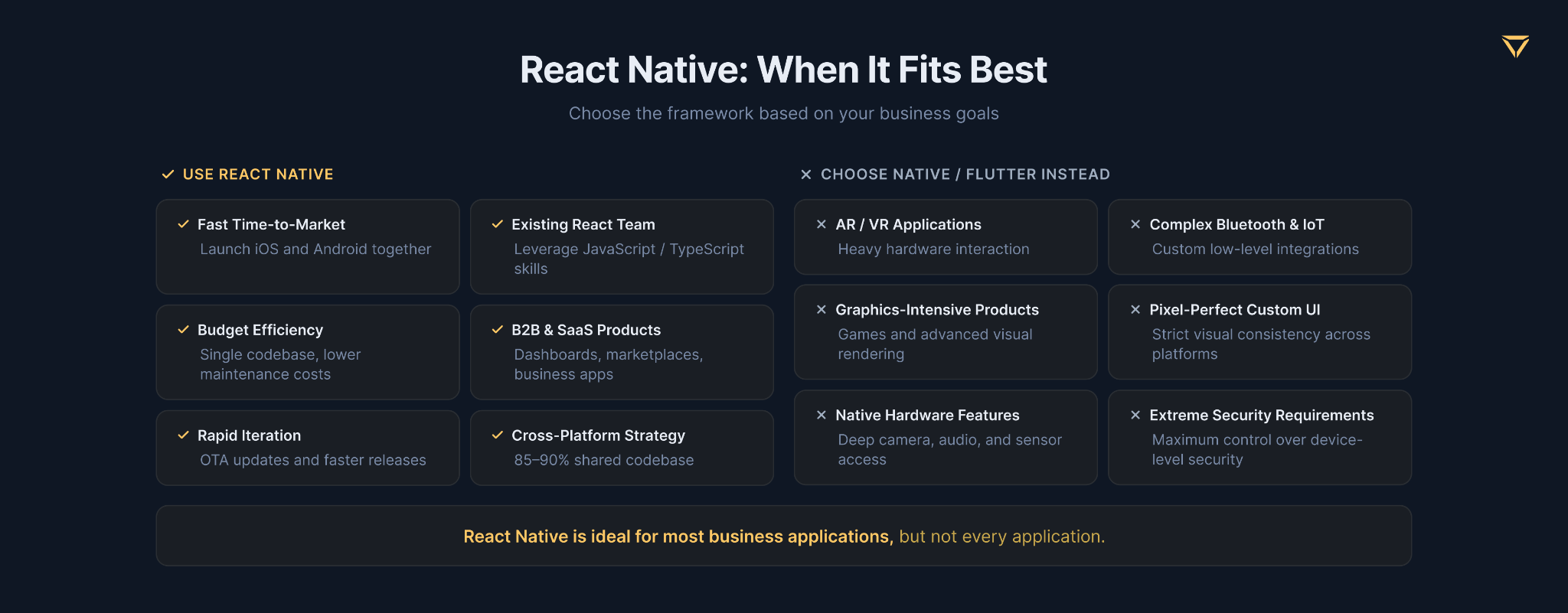
If you're wondering, “Is React Native good for mobile app development in my specific case?”, you're already thinking in the right direction. At Stubbs, we believe that the most valuable information a CTO can gain from a technical consultant is an honest discussion of the technology's limitations. React Native isn't a one-size-fits-all solution, and marketing shouldn't determine architectural decisions. Below are the criteria for determining when React Native for mobile app development will be your competitive advantage and when it will be a source of endless technical debt.
React Native Is the Right Choice When...
Choosing this stack is justified and will yield the maximum ROI if your project meets the following criteria:
- The team has strong expertise in JavaScript/TypeScript. You don't need to hire expensive, highly specialized iOS (Swift) and Android (Kotlin) engineers. Your current web development team, working in React/Next.js, will be able to quickly adapt to mobile development. It will be able to reuse knowledge of architecture, hooks, and state management.
- Time-to-market is critical. Releasing an MVP on React Native takes an average of 2-3 months, while developing two parallel native codebases would require 5-6 months. For startups, this is often a matter of survival.
- App type. React Native is suitable for content-oriented products, B2B tools, marketplaces, e-commerce platforms, fintech clients, and SaaS products.
- Budget constraints. Maintaining a single codebase saves businesses on their development and subsequent maintenance budget.
- The need for rapid iterations. With Expo EAS Update, you can deliver bug fixes and business logic updates directly to users' devices, bypassing lengthy review processes in the App Store and Google Play. The once-popular Microsoft CodePush was discontinued in 2025, and EAS Update is now the industry standard.
Thus, React Native can be recommended for complex apps to accelerate time-to-market. An example from our practice is the Flymingo travel app. Built with React Native and Node.js over 10 months, Flymingo is an Uber-like platform connecting charter flight pilots with travelers to the Bahamas. Our team implemented a custom flight bidding system, accurate aircraft weight calculations, and complex split-payment logic via Stripe. This allowed passengers to divide costs and share payment links via SMS.
Another app was developed even faster, in just 4 months. Our engineers have built Diatom using React Native and MongoDB. This is a social app that acts as a personal event organizer and gift-curation platform. We integrated cross-platform contact syncing, a timezone-aware calendar with Twilio SMS reminders, and an interactive onboarding quiz that automatically generates personalized wishlists for users.
React Native Is NOT the Right Choice When...
This is the most honest section of our article. We will recommend alternatives to React Native if:
- The app requires low-level hardware interaction. If your core business is built on AR/VR, complex data transfer over custom Bluetooth protocols, real-time audio streaming, or creating a custom camera pipeline, choose pure Native. Writing endless bridges and C++ JSI modules will override all the benefits of cross-platform support.
- A pixel-perfect custom UI is critical. If the design team demands absolutely identical, custom UI behavior with custom shadow and graphics rendering, choose Flutter. It will ignore Apple and Google guidelines, and its rendering engine (Impeller/Skia) will give you complete control over every pixel.
- The team has no experience with JS/React. If your staff consists of Java/Kotlin or C# developers, the cost of retraining the team and the number of errors will significantly outweigh the financial benefit of a unified codebase.
- You're developing a game or a graphics-intensive product. React Native is a framework for business applications. For 3D graphics, complex physics engines, and high-FPS games, the right choice is Unity or Unreal Engine.
- The product has extreme security requirements. While RN can be made very secure, defense-grade applications or ultra-secure crypto wallets often require deep control over native binary obfuscation and memory protection. This is easier and more reliable to implement in pure Swift/Kotlin.
React Native App Development Best Practices
Even the most advanced architecture can fall apart if the team neglects engineering rules. Successful enterprise-level React Native app development requires code quality standards, test coverage, and automated delivery processes. Below, we've compiled a set of proven React Native mobile app development standards that we implement in our projects.
TypeScript First
Using pure JavaScript for mobile development can result in technical debt. That is why developers choose TypeScript and use it to type everything from API responses to navigation parameters.
Let’s consider a specific example from production. In legacy JavaScript code, calling navigation.navigate('UserProfile', { id: 123 }) will work even if the screen expects the userId: '123'. This will lead to a runtime crash. Typed navigation in Expo Router / React Navigation detects this error while the developer is writing code in the IDE.
Testing Strategy
It’s not rational to test every UI component with unit tests. So, choose a standard testing logic:
- Unit: Test pure functions, business logic, and data transformations.
- Component (React Native Testing Library): Test critical UI states, such as loading, errors, and empty lists. Tests are written not for the component's internal implementation, but for what the user sees, for example, getByText('Submit').
- E2E (End-to-End): To simulate the real user journey, use Detox from Wix or the modern Maestro. Why Detox or Maestro and not Appium? Appium operates as a black box. This often results in flakiness due to animation timing issues. Detox is a gray box. It synchronizes at the JSI level and waits for network requests and animations in React Native to complete before executing the next test step.
CI/CD and OTA Updates
The CI/CD landscape for React Native is diverse and depends on your project's architecture. Many established enterprise teams successfully rely on robust pipelines built with Bitrise, GitHub Actions, CircleCI, or custom Fastlane scripts. Still, the modern automation standard for a rapidly growing share of the market is EAS Build (Expo Application Services). This is especially true for Expo-based projects. EAS compiles projects in the cloud, eliminating the need for local Mac servers and the endless certificate conflicts that come with them.
EAS Update allows you to quickly deliver critical patches and JS bundle updates to users, bypassing the week-long wait for App Store reviews. An important architectural limitation is that OTA updates can only change JavaScript code and assets such as images and fonts. If you add a new native library, e.g., a camera SDK, you will have to issue a full release through the stores.
According to the standard GitHub Actions flow, each Pull Request triggers linters and Jest tests. Before merging into the main branch, automated E2E tests are run in the cloud. This ensures that the new code doesn't break critical business processes.
Security Considerations
For B2B tools, fintech, and healthcare (HIPAA), React Native app development requires a special approach to security:
- Sensitive data storage. Do not use standard AsyncStorage to store JWT tokens, passwords, or personal data. This is a plain text file, easily readable on a broken device. Use native hardware encryption via react-native-keychain or expo-secure-store (iOS Keychain / Android Keystore).
- Code obfuscation. The Hermes engine provides a basic level of protection out of the box. It doesn't store your JavaScript as readable text, but compiles it into bytecode. For apps with high security requirements, configure ProGuard/R8 for the native layer on Android. You can also use commercial obfuscators like Jscrambler to make reverse engineering as difficult as possible.
React Native App Development Process — From Idea to Launch
Successful React Native app development requires not only clean code but also a predictable project management process. Lack of transparency during the development stages is the main pain point for businesses when working with outsourced teams. At Stubbs, we've built an engineering process that ensures mobile app development with React Native is transparent for the CTO and predictable for the CEO's financial forecasts. Our core team consists of 20 middle and senior-level developers with an average of 5 years of dedicated experience in React and React Native ecosystems, ensuring enterprise-grade code quality. Below is our standard product development lifecycle, from initiating the project to scaling it into production:
1. Discovery Phase & Architecture Design
When you develop complex systems, it is important to fix technical errors in documentation and architecture diagrams. This is much cheaper than refactoring finished code in production. That is why, during the Discovery Phase, we don't write code. We design the system. In particular, we select optimal state management by choosing between React Query and Zustand. Our specialists design the database schema and API contracts. We create a detailed specification of native modules, if required. We create an accurate backlog and timeline for the project.
2. Iterative Development & Continuous Delivery
We work with classic two-week sprints, but with one important difference. The client should see real progress on their device, not just closed tickets in Jira. Thanks to EAS Build and CI/CD automation, you receive a fresh app build at the end of each sprint:
- iOS: Install via TestFlight.
- Android: Install via Firebase App Distribution.
You test new features, animations, and business logic in real-world conditions. This allows you to instantly adjust the product's course without accumulating technical debt.
3. QA and The Launch Checklist
Publishing an app is a separate engineering process. Apple and Google platforms regularly tighten their moderation rules. Our launch checklist includes the following:
- Full regression testing through a combination of manual QA and end-to-end testing in Detox.
- Preparing metadata, including screenshots in all sizes, localization, and a GDPR/CCPA-compliant Privacy Policy.
- Basic App Store Optimization (ASO) – setting up keywords and descriptions for organic growth.
- Ensuring there are no hidden calls to Apple's private APIs, which often occur with uncontrolled use of third-party NPM packages.
4. Post-Launch: Monitoring & Analytics
Launching the app in stores is just the beginning of a product's lifecycle. An enterprise approach requires permanent monitoring of its work:
- Crashes and Errors. We integrate Sentry or Firebase Crashlytics. If a user experiences an app crash on a specific Android model, the system immediately records it, storing the stack trace and breadcrumbs.
- Product Analytics. To understand how users interact with the interface, we set up event tracking through Mixpanel or Amplitude.
- Support SLA. As part of our ongoing support, we provide metric monitoring, prompt bug fixes via OTA updates, and scheduled updates to major React Native/Expo versions.
Building a mobile product with React Native?
Stubbs has shipped production RN apps for startups and enterprises across Europe and the US.
FAQs
1. Is React Native good for mobile app development?
Is React Native good for mobile app development?
Yes, for most B2C and B2B products, React Native is an excellent choice. It allows reusing code across iOS and Android. This way, it reduces development time and support costs. The exceptions are hardware-intensive apps or products with completely custom, pixel-perfect interfaces. In such cases, Flutter or pure Native is a better choice.
2. How much does React Native app development cost?
How much does React Native app development cost?
The final cost depends heavily on the functionality's complexity. Creating an MVP typically costs between $15,000 and $40,000; a standard B2C product costs between $40,000 and $100,000; and a comprehensive platform with payments and real-time logic costs $100,000 and up. Thanks to a unified codebase, development in React Native is, on average, 30–40% cheaper than creating two separate native apps.
3. How long does it take to develop a React Native app?
How long does it take to develop a React Native app?
Launching an MVP with a basic feature set takes 2 to 4 months. Developing a full-fledged product with complex business logic takes 4 to 8 months, and scalable enterprise solutions can take 8 to 18 months. The framework's main advantage is that parallel development for iOS and Android significantly reduces overall time-to-market compared with two independent native teams.
4. What is the difference between React Native and Flutter?
What is the difference between React Native and Flutter?
React Native uses JavaScript/TypeScript and manages native OS UI components, creating a familiar, native user experience. Flutter is written in Dart and renders its own UI using the Impeller/Skia graphics engine, ignoring native elements. React Native is a good choice for teams with JavaScript expertise. Flutter is better suited for projects with highly customized designs.
5. Can React Native replace native iOS and Android development?
Can React Native replace native iOS and Android development?
The answer is "yes" for the vast majority of product business models. React Native easily covers approximately 80-90% of scenarios in B2C and B2B mobile development. However, classic Native remains the efficient choice for applications requiring low-level hardware access. These could include AR/VR, custom audio processing, non-standard Bluetooth protocols, and so on. It is also better suited to products with stringent binary security requirements.
6. What is React Native New Architecture, and does it matter?
What is React Native New Architecture, and does it matter?
The New Architecture is based on JSI, Fabric, and TurboModules. It eliminates the legacy asynchronous bridge. Thanks to JSI, JavaScript code can call native methods directly and synchronously. This improves performance for large lists and animations. New Architecture speeds up startup time and unlocks concurrent features in React 18+.
7. How do I choose a React Native development team?
How do I choose a React Native development team?
Key selection criteria include a real production portfolio, strong proficiency in TypeScript, and a deep understanding of New Architecture. Be sure to ask candidates about their experience working with native modules and setting up CI/CD through Expo EAS. This will immediately demonstrate the depth of their knowledge. Typically, outsourcing teams with experience launching complex FinTech or B2B products possess the necessary level of engineering culture.
Jun. 19, 2026
20:50 min to read